Shiftmate
Expiration date tracking Excel and batch stock chart
Register products by batch, location and due date. See remaining quantity, past dates, and upcoming parties within your specified day range.
Prepared by:Shiftmate Product and Operations Team · Son kontrol:
Actual file previews
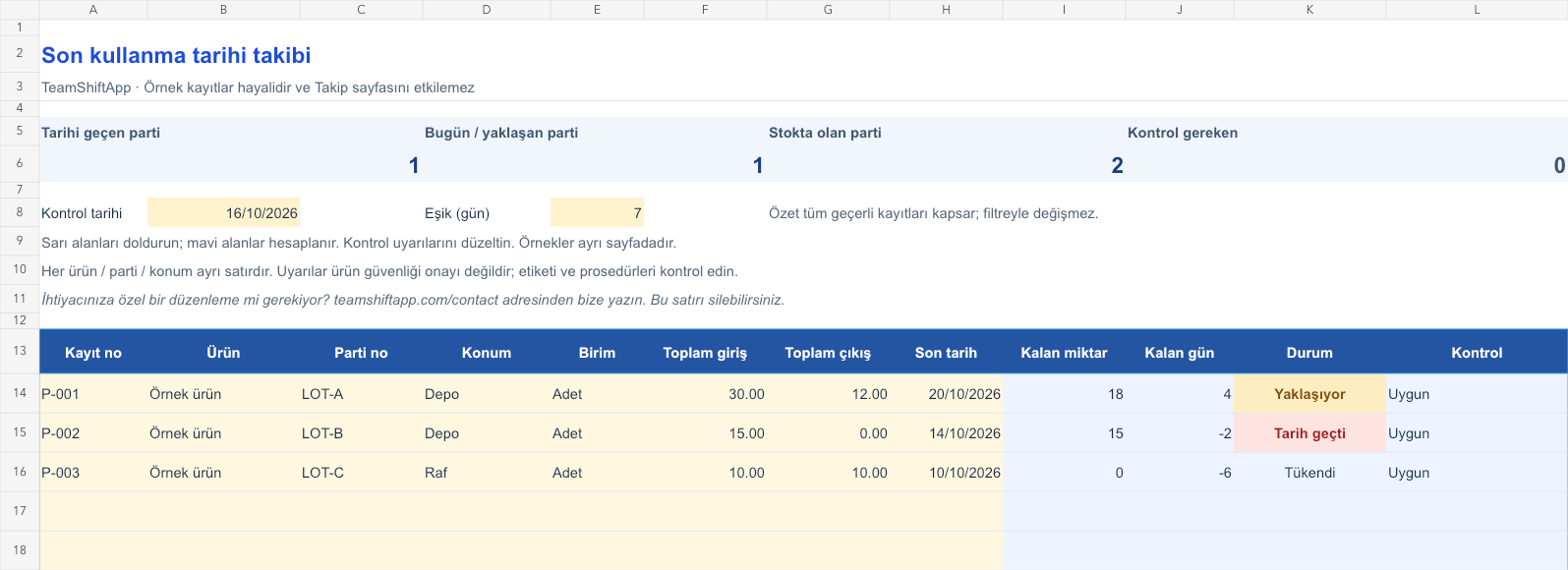
The images below are the actual data entry and executive summary pages of the workbook to be downloaded.

Step by step usage
Examine the example and prepare the blank file
Assign a separate registration number to each product, lot and location combination. You can track the quantity of the same batch in two warehouses with two separate lines. Write down the product, batch code, location, unit, and expiration date on the label. Enter total input and total output in the same unit; If there is no output, use 0. The upper threshold determines how many days in advance you want a warning when the date approaches. The default value is 7 days. The tracking page comes up blank; The products and dates on the sample page are fictitious. Do not combine different batches of the same product.
Write actual records in the yellow fields
Remaining stock is input minus output. The remaining days are found by subtracting the control date from the last date entered. If the remaining stock is zero, Out of Stock appears, if the date is past, Date appears, and if the date is today, Today appears. If the positive remaining day is within the threshold you set, it is written as Approaching, if it is further ahead, it is written as Future. The top summary counts the remaining batch lines instead of adding up the stock quantities with different units. Negative quantity, output exceeding input or re-registration of the same product, batch and location produces a control alert. Records with warnings are excluded from the summary.
Fix control alerts and review summary
Check outdated records with physical stock. Sort upcoming batches by date and prioritize processing. Compare receipt and issue totals with inventory counting.
What does this Excel file solve?
Register products by batch, location and due date. See remaining quantity, past dates, and upcoming parties within your specified day range. Assign a separate registration number to each product, lot and location combination. You can track the quantity of the same batch in two warehouses with two separate lines. Write down the product, batch code, location, unit, and expiration date on the label. Enter total input and total output in the same unit; If there is no output, use 0. The upper threshold determines how many days in advance you want a warning when the date approaches. The default value is 7 days. The tracking page comes up blank; The products and dates on the sample page are fictitious. Do not combine different batches of the same product.
What's inside the file?
Registration based on batch and location, Entry, exit and remaining quantity, Adjustable upcoming date threshold, Date past/present/upcoming alerts. The file contains sample rows, canned formulas, data validation fields, risk colorings, and executive summary.
Calculation and control logic
Remaining stock is input minus output. The remaining days are found by subtracting the control date from the last date entered. If the remaining stock is zero, Out of Stock appears, if the date is past, Date appears, and if the date is today, Today appears. If the positive remaining day is within the threshold you set, it is written as Approaching, if it is further ahead, it is written as Future. The top summary counts the remaining batch lines instead of adding up the stock quantities with different units. Negative quantity, output exceeding input or re-registration of the same product, batch and location produces a control alert. Records with warnings are excluded from the summary.
Worked example: Batches of the same product with different dates
Lot A: input 30, output 12 units; The deadline is October 20. Batch B: input 15, output 0 units; The deadline is October 14. Check: October 16, 2026; threshold: 7 days. Result: With 18 units and 4 days remaining for Batch A, the status becomes Approaching. For batch B remaining 15 units and -2 days, the status becomes Date passed. Bringing the two parties under a single date would cause this distinction to be lost.
Decisions that can be taken as a result of this
Check outdated records with physical stock. Sort upcoming batches by date and prioritize processing. Compare receipt and issue totals with inventory counting
Common usage mistakes
Mistaking date types that have different meanings on the label as the same. Writing the new batch over the old batch line. Entering the output in a different unit and calculating the remaining amount incorrectly
Limits and proper use
This table provides date visibility, not a food or product safety decision. The expiration date and the recommended consumption date are not the same; Rely on the product label and your business' applicable procedures. Color warning is not a sales or consumption permit. There is no detailed history of stock movements and no barcode links. The summary of 150 rows does not sum different units and does not change depending on the filter. The upcoming date threshold is your operational control window; It is not a legal period.
Compatibility and quality control
Two pages of this file were visually inspected; Formulas were recalculated and checked in empty, sample and incorrect entry scenarios. There was no separate device testing of the Excel desktop application. .xlsx without macro; formulas and drop-down lists are included in the file. The tracking page includes 150 preset record lines and a standalone Sample page. Prepared for desktop Excel; Check views and validations in other spreadsheet applications.
Scope of this file
It supports independent file date checking. It does not confirm the safety, fitness for sale or storage conditions of the product. Shiftmate application is not batch-based warehouse software.
Relevant official and technical resources
Frequently asked questions
Can I write different deadlines for the same product?
Yes. Each batch is kept on a separate line. If the same party is in two locations, separate the locations as well; Do not register the same product, batch and location twice.
Can I make the warning interval 30 days?
Yes. Set the Threshold (days) cell at the top to 30. Remaining lots within the next 30 days appear as Approaching.
Will a product that is expired but out of stock be warned?
When the remaining stock is zero, the status becomes Out of Stock and the date is not included in the number of on-hand lots at risk.
Does the file say the product is safe?
No. It only compares the date and amount you enter; It is not a substitute for labeling, storage conditions and competent evaluation of the product.