Shiftmate
Physical stock counting and stock difference analysis Excel
Compare the system stock with the physical count, see the quantity and monetary differences on a product basis.
Prepared by:Shiftmate Product and Operations Team · Son kontrol:
Actual file previews
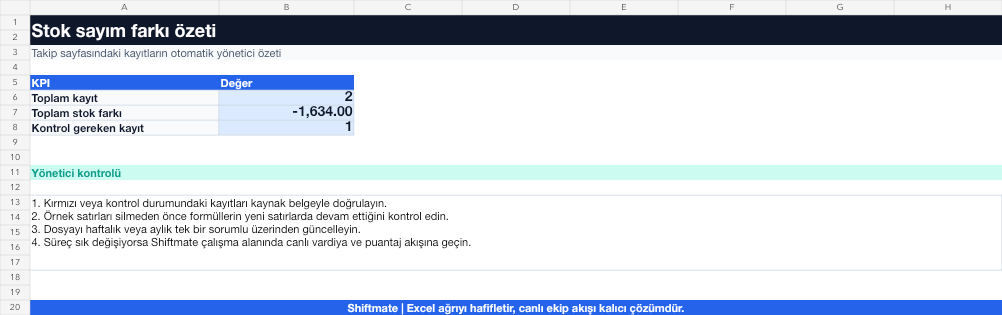
The images below are the actual data entry and executive summary pages of the workbook to be downloaded.

Step by step usage
Prepare the file according to your business
Enter the product code, product name, unit of measurement, system stock, physical count, current unit cost and counting manager for the same counting moment.
Run formulas and checks
The quantity difference is physical stock minus system stock. The monetary difference is the quantity difference multiplied by the unit cost; The percentage deviation indicates the magnitude of the difference relative to the system stock.
Turn results into action
Review the indicators on the summary page. Stop movements at the time of counting. Check out the high-consistency difference first. Add explanation and approval to the correction action.
What does this Excel file solve?
Compare the system stock with the physical count, see the quantity and monetary differences on a product basis. Enter the product code, product name, unit of measurement, system stock, physical count, current unit cost and counting manager for the same counting moment.
What's inside the file?
System and physical stock, Quantity difference, Monetary difference, Deviation warning. The file contains sample rows, canned formulas, data validation fields, risk colorings, and executive summary.
Calculation and control logic
The quantity difference is physical stock minus system stock. The monetary difference is the quantity difference multiplied by the unit cost; The percentage deviation indicates the magnitude of the difference relative to the system stock.
Worked example: Monthly kitchen census
System: 48 kg. Physical: 42.5 kg. Unit cost: 310 TL/kg. Result: The difference appears -5.5 kg and -1.705 TL; Recipe consumption, wastage recording and delivery movements are checked.
Decisions that can be taken as a result of this
Stop movements at the time of counting. Check out the high-consistency difference first. Add comment and approval to correction action
Common usage mistakes
Comparing different units of measurement. Continuing to buy or sell during the count. Equating the system stock to the physical result without evidence
Limits and proper use
Analysis shows the difference, not proves why. Root cause control is required through purchasing, transfer, prescription, wastage and sales transactions.
Compatibility and quality control
All 67 workbooks underwent formula error scanning, recalculation checking, and page-by-page visual inspection. Standard .xlsx file; Does not contain macros or external links. Formulas and data validation fields run inside the file. It is recommended that you keep the original file and work on a separate copy for your business.
Transitioning from Excel to automation
Use the file to solve restaurant operation needs immediately. When registration and approval traffic grows, move the same process to the Shiftmate workspace.
Frequently asked questions
Is positive stock difference also a problem?
Yes. It may indicate excess physical stock, missing entries, wrong units or recipe consumption errors.
Which products should be counted first?
Cycle count high-value, fast-consumption and historically high-variance products more frequently.