Shiftmate
Restaurant waste and loss tracking Excel template
Track spoilage, preparation, portion, return and production wastage with quantity and loss cost.
Prepared by:Shiftmate Product and Operations Team · Son kontrol:
Actual file previews
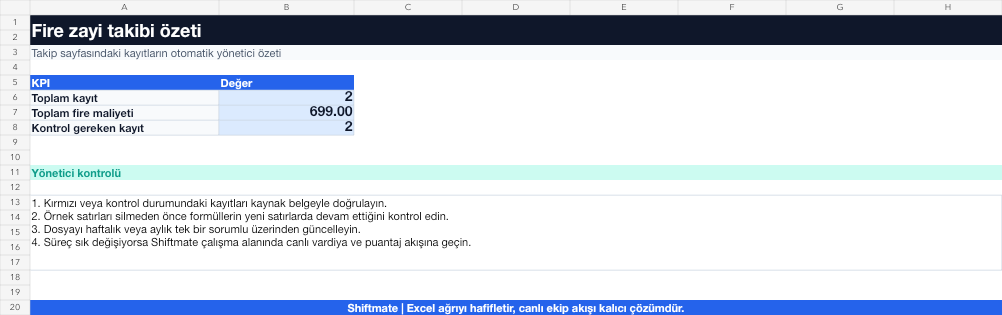
The images below are the actual data entry and executive summary pages of the workbook to be downloaded.

Step by step usage
Prepare the file according to your business
Record the wastage date, product or material, cause category, quantity, unit of measurement, unit cost, person responsible and action taken.
Run formulas and checks
The loss amount is the quantity multiplied by the unit cost. Examining totals by cause and product shows recurring patterns of loss rather than single events.
Turn results into action
Review the indicators on the summary page. Standardize the why list. Examine high amount and high frequency separately. After action, measure again for the same reason.
What does this Excel file solve?
Track spoilage, preparation, portion, return and production wastage with quantity and loss cost. Record the wastage date, product or material, cause category, quantity, unit of measurement, unit cost, person responsible and action taken.
What's inside the file?
Cause of waste, Quantity and unit cost, Loss amount, Action tracking. The file contains sample rows, canned formulas, data validation fields, risk colorings, and executive summary.
Calculation and control logic
The loss amount is the quantity multiplied by the unit cost. Examining totals by cause and product shows recurring patterns of loss rather than single events.
Worked example: Weekly wastage review
Total loss: 7,840 TL. Preparation loss: 3.120 TL. Spoilage: 2,960 TL. Result: Most of the preparation waste is concentrated in the same product; Action is opened for portion standard and preparation training.
Decisions that can be taken as a result of this
Standardize the why list. Examine high amount and high frequency separately. Remeasure the same reason after action
Common usage mistakes
Monitoring waste only with quantity, without any cost. Writing free text why for each event. Putting catering, staff meals and spoilage in the same category
Limits and proper use
The file does not automatically extract the theoretical consumption difference; For accurate results, reconciliation with stock, recipe and sales records is required.
Compatibility and quality control
All 67 workbooks underwent formula error scanning, recalculation checking, and page-by-page visual inspection. Standard .xlsx file; Does not contain macros or external links. Formulas and data validation fields run inside the file. It is recommended that you keep the original file and work on a separate copy for your business.
Transitioning from Excel to automation
Use the file to solve restaurant operation needs immediately. When registration and approval traffic grows, move the same process to the Shiftmate workspace.
Relevant official and technical resources
Frequently asked questions
Are fire and loss the same thing?
Break it down according to your business description. Monitoring the expected waste in preparation and preventable deterioration or error loss in different categories clarifies the action.
From what date should the unit cost be taken?
If possible, use the current purchasing or weighted cost closest to the event date and do not change the method during the period.