Shiftmate
Order tracking Excel and partial delivery schedule
See requested, delivered and remaining quantity on customer orders. Track deadlines, completion rate and open order lines with Excel.
Prepared by:Shiftmate Product and Operations Team · Son kontrol:
Actual file previews
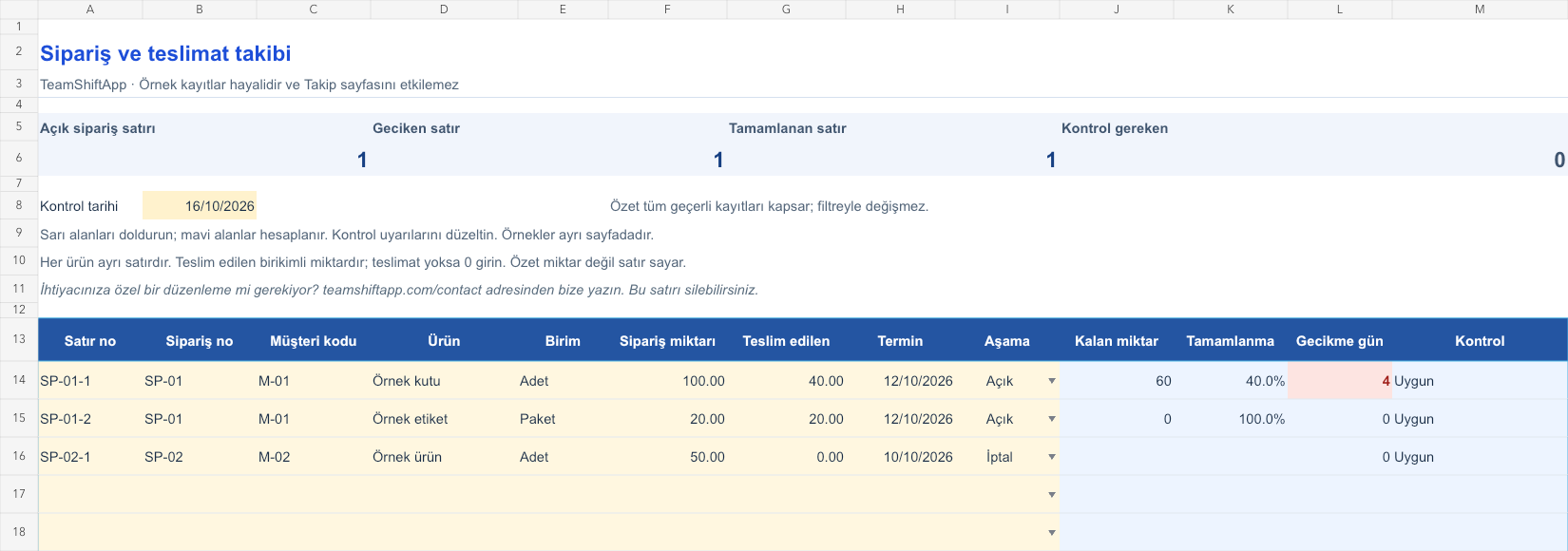
The images below are the actual data entry and executive summary pages of the workbook to be downloaded.

Step by step usage
Examine the example and prepare the blank file
Give each order item a unique line number. The order reference may be the same across multiple products; The line number cannot be the same. Type the customer code, product, unit, order quantity and delivery deadline. The Delivered field is the cumulative delivery quantity for that product; If there is no delivery yet, enter 0. Select Open or Cancel phase. For example, if there are 100 boxes and 20 packages of labels in the same order, open two records. Do not mix different units such as pieces, packages and kilograms in one line.
Write actual records in the yellow fields
The remaining amount is the order quantity minus the delivered quantity. The fill rate is the quantity delivered divided by the order quantity. On a line with an open and remaining amount, the delay is the positive difference between the control date and the deadline. Completed and canceled rows do not count towards the number of open jobs or delays. Summary counts open, overdue, and completed order lines rather than adding up the quantities of different products. Overdelivery, zero target quantity, missing units, or duplicate line number will generate a check alert. You must enter the quantities in the same unit of measurement.
Fix control alerts and review summary
From the overdue open lines, select the jobs for which the customer will be informed. Share the remaining amount with the preparation and shipping team. Separate the canceled rows from the open work list.
What does this Excel file solve?
See requested, delivered and remaining quantity on customer orders. Track deadlines, completion rate and open order lines with Excel. Give each order item a unique line number. The order reference may be the same across multiple products; The line number cannot be the same. Type the customer code, product, unit, order quantity and delivery deadline. The Delivered field is the cumulative delivery quantity for that product; If there is no delivery yet, enter 0. Select Open or Cancel phase. For example, if there are 100 boxes and 20 packages of labels in the same order, open two records. Do not mix different units such as pieces, packages and kilograms in one line.
What's inside the file?
Order and product line reference, Order / delivery / remaining quantity, Completion rate and deadline delay, Cancellation and overdelivery control. The file contains sample rows, canned formulas, data validation fields, risk colorings, and executive summary.
Calculation and control logic
The remaining amount is the order quantity minus the delivered quantity. The fill rate is the quantity delivered divided by the order quantity. On a line with an open and remaining amount, the delay is the positive difference between the control date and the deadline. Completed and canceled rows do not count towards the number of open jobs or delays. Summary counts open, overdue, and completed order lines rather than adding up the quantities of different products. Overdelivery, zero target quantity, missing units, or duplicate line number will generate a check alert. You must enter the quantities in the same unit of measurement.
Worked example: Delivery of an order in two parts
Order: 100 boxes. Total delivery: 40 units. Deadline: October 12, 2026. Checked: October 16, 2026. Result: Remaining quantity is 60 units, completion is 40 percent, and the delay is 4 days. If 30 more are sent in the second delivery, make the delivered total 70; The remaining amount is 30.
Decisions that can be taken as a result of this
From the overdue open lines, select the jobs for which the customer will be informed. Share the remaining amount with the preparation and shipping team. Separate canceled rows from open work list
Common usage mistakes
Substituting the second delivery amount into the cumulative total. Compressing all the products of the order into one line, even though they are different units. Interpreting cargo delivery as the entire customer order has been completed
Limits and proper use
This table is prepared for 150 order product lines; The order is not the number of titles. It does not provide shipment history, stock movement, reservation or invoicing. Historical on-time delivery performance is not measured on completed records; The delay is only for still open amounts. Returns and over-deliveries must first be reconciled with the order record. While the cargo file tracks the package movement, this file tracks the amount of product that needs to be given to the customer. The summary does not change with the filter.
Compatibility and quality control
Two pages of this file were visually inspected; Formulas were recalculated and checked in empty, sample and incorrect entry scenarios. There was no separate device testing of the Excel desktop application. .xlsx without macro; formulas and drop-down lists are included in the file. The tracking page includes 150 preset record lines and a standalone Sample page. Prepared for desktop Excel; Check views and validations in other spreadsheet applications.
Scope of this file
This file tracks order lines manually. It does not make stock reservations, delivery notes, cargo inquiries or automatic production planning; It is independent of the Shiftmate app.
Relevant official and technical resources
Frequently asked questions
How should I enter if there is more than one item in the same order?
Use separate lines and unique line numbers for each product. The order reference may remain the same; The product quantity and unit are calculated on its own line.
Is partial delivery supported?
Yes. Type the cumulative amount in the Delivered to field. The remaining and completion rate are updated; The delivery history is not stored separately.
Why is the delay of the completed row zero?
This indicator determines the open job priority. It does not measure the historical delay of completed work because there is no actual delivery date.
Is it automatically deducted from stock?
No. You must also save the transaction in your stock file or system. The order tracking table does not reserve stock.