Shiftmate
Production work order and deadline tracking Excel template
Track production orders, target quantity, solid production, wastage and deadline. See remaining work and overdue orders with Excel.
Prepared by:Shiftmate Product and Operations Team · Son kontrol:
Actual file previews
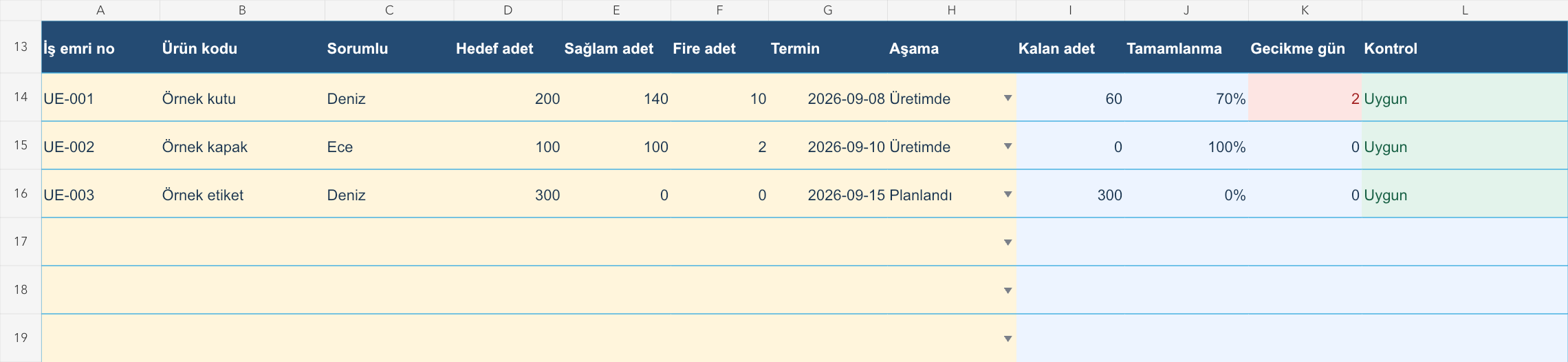
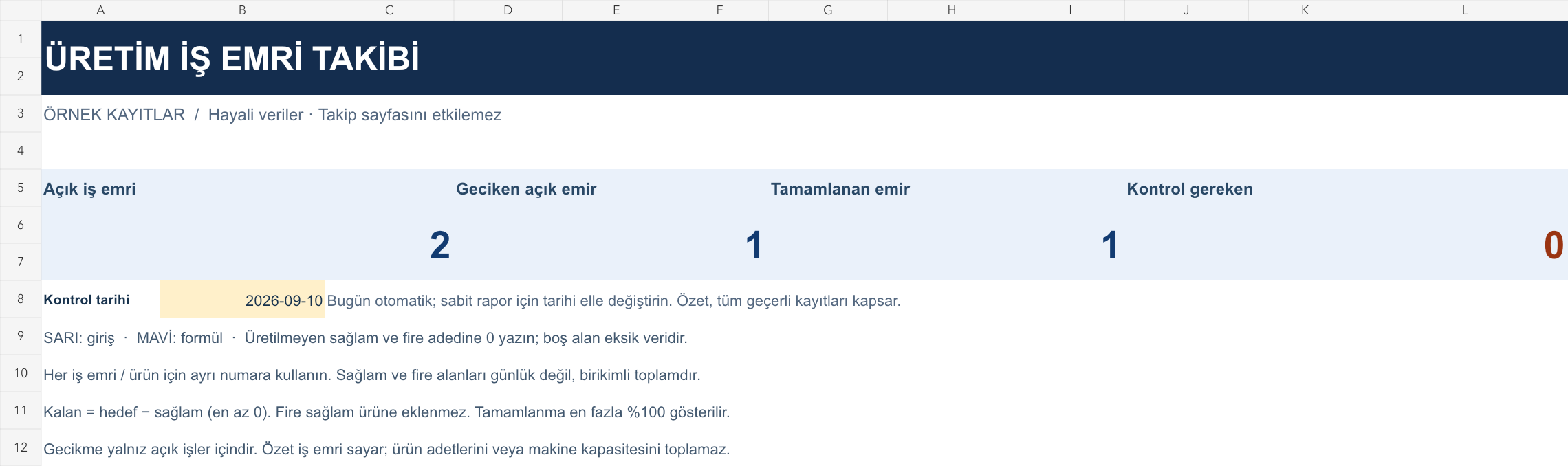
The images below are the actual data entry and executive summary pages of the workbook to be downloaded.
Step by step usage
Examine the example and prepare the blank file
Open a single record for each work order and product; If there are different products in the same order, use unique sub-numbers. Enter the product code, responsible person, target quantity and due date. Select the stage from the drop-down list. Write the totals produced in the period into the solid and wastage units; If there is no production, enter 0 in both fields. It means the free space has not been counted yet. The records on the Sample page are fictitious and are not included in the Tracking page total. Use the same unit of measurement on every order.
Write actual records in the yellow fields
The remaining quantity is calculated by subtracting the intact quantity from the target quantity; Waste is not added to solid production. If there is overproduction, the residual value stops at zero and the completion rate is limited to 100 percent; menstrual area protects actual production. When a solid number reaches the target, the job is considered numerically completed. Delay is the positive difference between the control date and the deadline only for valid jobs that have not yet been completed or canceled. The summary shows the number of open and completed work orders, not total units; It does not add up the quantities of different products as a meaningful measure of capacity.
Fix control alerts and review summary
Move open orders that are overdue to the daily production meeting. Do not close the order before solid production reaches the target. Also investigate the reason for products with increased wastage.
What does this Excel file solve?
Track production orders, target quantity, solid production, wastage and deadline. See remaining work and overdue orders with Excel. Open a single record for each work order and product; If there are different products in the same order, use unique sub-numbers. Enter the product code, responsible person, target quantity and due date. Select the stage from the drop-down list. Write the totals produced in the period into the solid and wastage units; If there is no production, enter 0 in both fields. It means the free space has not been counted yet. The records on the Sample page are fictitious and are not included in the Tracking page total. Use the same unit of measurement on every order.
What's inside the file?
Work order and product code, Target, intact and wasted number, Remaining quantity and completion rate, Deadline and record control. The file contains sample rows, canned formulas, data validation fields, risk colorings, and executive summary.
Calculation and control logic
The remaining quantity is calculated by subtracting the intact quantity from the target quantity; Waste is not added to solid production. If there is overproduction, the residual value stops at zero and the completion rate is limited to 100 percent; menstrual area protects actual production. When a solid number reaches the target, the job is considered numerically completed. Delay is the positive difference between the control date and the deadline only for valid jobs that have not yet been completed or canceled. The summary shows the number of open and completed work orders, not total units; It does not add up the quantities of different products as a meaningful measure of capacity.
Worked example: Separating waste from intact product
Target: 200 units. Solid production: 140 units. Fire: 10 pieces. Deadline: September 8; check: September 10, 2026. Result: Remaining production is 60 units, completion is 70 percent, and the open job is 2 days late. Adding the wastage to the solid quantity would incorrectly show the remaining work as 50.
Decisions that can be taken as a result of this
Move open orders that are overdue to the daily production meeting. Do not close the order before solid production reaches the target. Also investigate the reason for products with increased wastage.
Common usage mistakes
Accidentally writing in daily production instead of adding it to the previous total. Increasing the completion rate by incorporating waste into a solid product. Changing the target later and not recording the change in the sales order separately
Limits and proper use
This workbook does not perform finite capacity scheduling, material requirements planning, or automatic job sequencing. Machine hours and stock reservations are not calculated. Historical on-time delivery performance of completed orders is not measured; The delay indicator is for open jobs. Order changes and quality approvals must be verified by separate registration. The 150-line summary covers all valid work orders, regardless of filters.
Compatibility and quality control
Two pages of this file were visually inspected; Formulas were recalculated and checked in empty, sample and incorrect entry scenarios. There was no separate device testing of the Excel desktop application. .xlsx without macro; formulas and drop-down lists are included in the file. The tracking page includes 150 preset record lines and a standalone Sample page. Prepared for desktop Excel; Check views and validations in other spreadsheet applications.
Scope of this file
This file is an independent resource for tracking production work orders. Shiftmate is not an MRP, ERP or production planning system; It does not offer work order, recipe and machine capacity management.
Relevant official and technical resources
Frequently asked questions
Will the file give an error if I exceed the production target?
No. Maintains real solid quantity; indicates zero remaining amount and 100 percent completion. Also check that the overproduction belongs to the correct order.
Does this template replace the stock or recipe file?
No. The stock file keeps track of the material, the recipe file keeps track of the product composition. What is tracked here is the production quantity of the work order and the open job deadline.
Is leaving the healthy menstrual field blank the same as zero?
It is not. If no production was made, enter 0. A mandatory numeric field left blank produces a control warning and the record is not included in the accounts.