Shiftmate
Invoice collection tracking Excel and receivables aging table
Track customer invoices, partial collections and remaining receivables. Free Excel that separates past due balance into 1–30, 31–60, 61–90 and 90+ days.
Prepared by:Shiftmate Product and Operations Team · Son kontrol:
Actual file previews
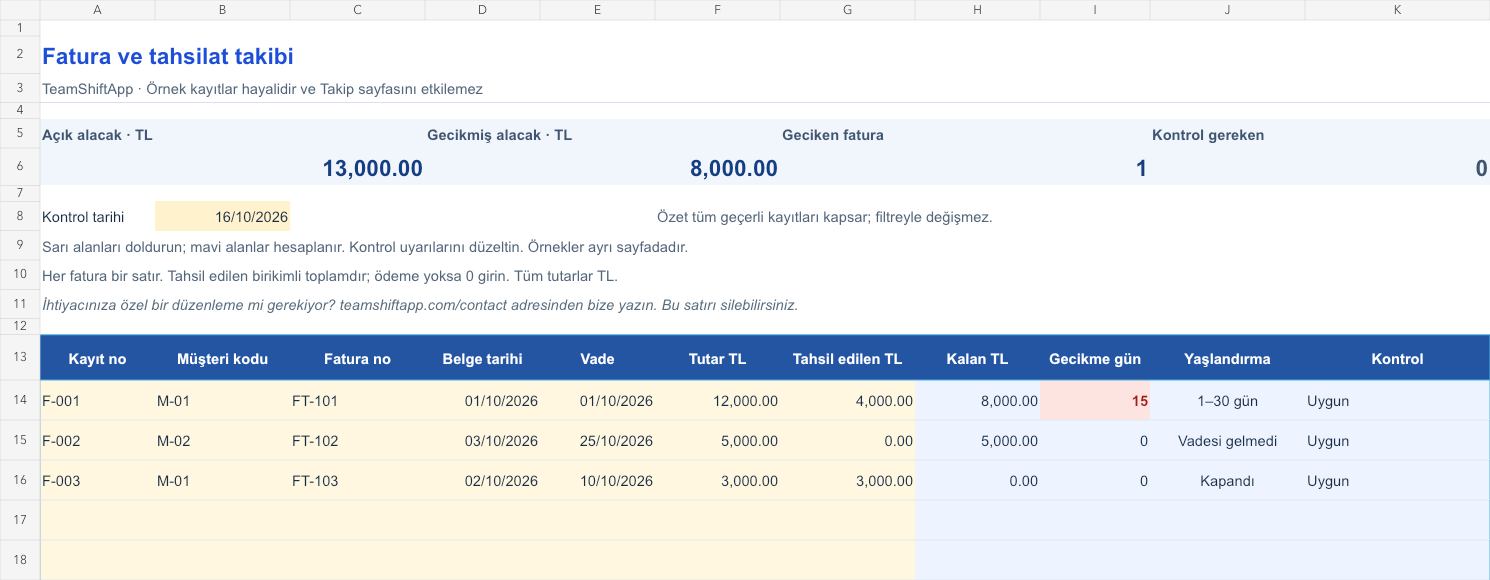
The images below are the actual data entry and executive summary pages of the workbook to be downloaded.

Step by step usage
Examine the example and prepare the blank file
Open a unique record number for each customer invoice. Type the customer code, invoice number, issue date and maturity. Match the total amount with the TL amount payable in your document; The file also does not calculate VAT. The Collected field is the cumulative total of payments distributed to that invoice. If there is no payment yet, type 0, do not leave it blank. If a bank payment settles more than one invoice, distribute the amount among the relevant lines. Do not re-type the same payment in full on each line. Enter the actual data on the Tracking page; The fictitious records on the example page are independent.
Write actual records in the yellow fields
The remaining credit is the invoice amount minus the amount collected. On the line with an open balance, the delay is the positive calendar day difference between the control date and the maturity date. The delay on the maturity date is zero. Open balance falls into one of the 1–30, 31–60, 61–90 and 90+ day groups; Those that are not due also appear. The group of the fully collected invoice becomes Closed. Negative amounts, collections larger than the invoice, missing dates or duplicate registration numbers are not credited to the accounts; The control column shows the reason. Do not use the above balance total as the final list without correcting these warnings.
Fix control alerts and review summary
Place overdue invoices in the reconciliation list with the customer. Compare the partial payment distribution with the bank statement. Review the list of open balances by aging group.
What does this Excel file solve?
Track customer invoices, partial collections and remaining receivables. Free Excel that separates past due balance into 1–30, 31–60, 61–90 and 90+ days. Open a unique record number for each customer invoice. Type the customer code, invoice number, issue date and maturity. Match the total amount with the TL amount payable in your document; The file also does not calculate VAT. The Collected field is the cumulative total of payments distributed to that invoice. If there is no payment yet, type 0, do not leave it blank. If a bank payment settles more than one invoice, distribute the amount among the relevant lines. Do not re-type the same payment in full on each line. Enter the actual data on the Tracking page; The fictitious records on the example page are independent.
What's inside the file?
Remaining receivables based on invoices, Partial collection and overpayment control, Maturity and aging groups, Overdue balance and incorrect posting summary. The file contains sample rows, canned formulas, data validation fields, risk colorings, and executive summary.
Calculation and control logic
The remaining credit is the invoice amount minus the amount collected. On the line with an open balance, the delay is the positive calendar day difference between the control date and the maturity date. The delay on the maturity date is zero. Open balance falls into one of the 1–30, 31–60, 61–90 and 90+ day groups; Those that are not due also appear. The group of the fully collected invoice becomes Closed. Negative amounts, collections larger than the invoice, missing dates or duplicate registration numbers are not credited to the accounts; The control column shows the reason. Do not use the above balance total as the final list without correcting these warnings.
Worked example: Finding the receivable remaining in partial collection
Invoice total: 12,000 TL. Collected: 4,000 TL. Maturity: 1 October 2026. Control date: 16 October 2026. Result: The remaining receivable is 8,000 TL, the delay is 15 days. Registration falls into the 1–30 day group. When the collected amount reaches 12,000 TL, the open balance is reset to zero and the record is closed.
Decisions that can be taken as a result of this
Place overdue invoices in the reconciliation list with the customer. Compare the partial payment distribution with the bank statement. Review the list of open balances by aging group
Common usage mistakes
Rewriting the customer total on each invoice. Leaving the record incomplete by leaving the uncollectible line blank. Refund the payment or keep the canceled invoice as a normal receivable
Limits and proper use
150 records were prepared. The summary covers all valid rows, regardless of filters, and works with the single currency TL. Do not add currencies to the same total. This is not a current account statement, e-invoice system or collection date history. Reconcile the returns and credit notes with your own records first. It does not issue invoices, calculate taxes and send messages to the customer. More than one person making changes to the same file copy can create version confusion.
Compatibility and quality control
Two pages of this file were visually inspected; Formulas were recalculated and checked in empty, sample and incorrect entry scenarios. There was no separate device testing of the Excel desktop application. .xlsx without macro; formulas and drop-down lists are included in the file. The tracking page includes 150 preset record lines and a standalone Sample page. Prepared for desktop Excel; Check views and validations in other spreadsheet applications.
Scope of this file
This file tracks customer receivables. It does not issue e-invoices, does not collect bank transactions, and does not send automatic collection messages. The Shiftmate app is not billing or accounting software.
Relevant official and technical resources
Frequently asked questions
What is its difference from the current account tracking template?
In this file, a line is an invoice and maturity aging is done. The current account file is for tracking different debit/credit transactions of the customer; The same payment must be consistent in both files.
What should I write if an invoice is paid in several parts?
In the Collected cell, type the total payment to date. For example, if 2,000 TL was followed by 3,000 TL, the value would be 5,000 TL; The second payment is not written alone.
What happens if I enter a payment greater than the invoice amount?
A control warning appears and this line is not included in the calculated balance. Examine whether the overpayment belongs to another invoice or advance payment.
Can I get a report for an old date?
You can change the check date; However, the collection field is the cumulative current amount. For the historical balance, you must use the payment totals for that day in a separate file copy.