Shiftmate
Cargo delivery and return tracking Excel template
Track cargo tracking numbers, delivery status, returned products and pending refunds in a single file. Update the data manually.
Prepared by:Shiftmate Product and Operations Team · Son kontrol:
Actual file previews
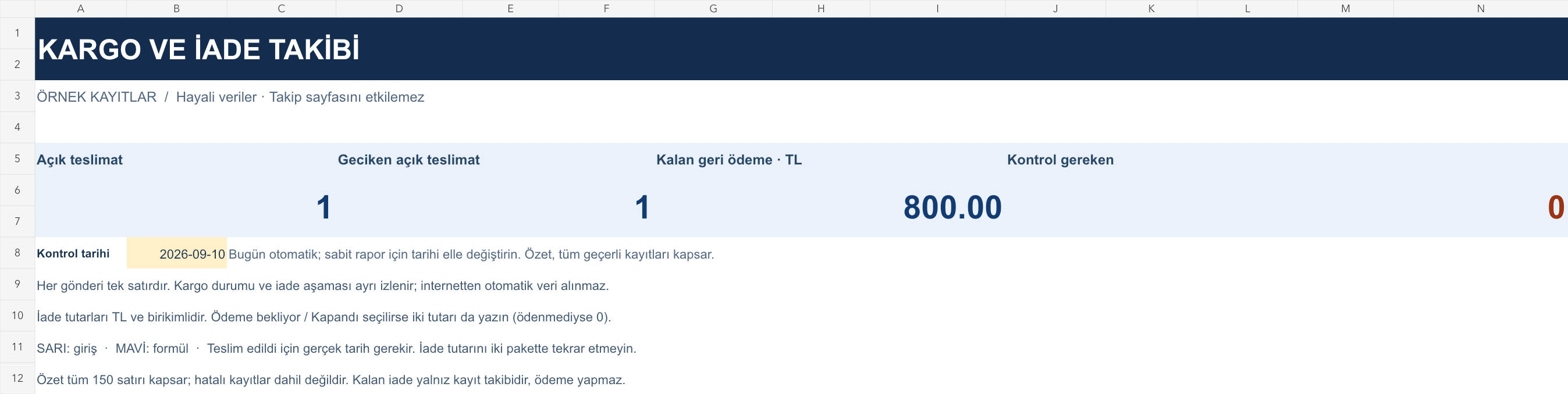
The images below are the actual data entry and executive summary pages of the workbook to be downloaded.

Step by step usage
Examine the example and prepare the blank file
Give each post a unique registration number. If the same order is split into two packages, open two shipping records and specify the order reference in both. Enter the shipping company, tracking number, departure date and target delivery date. The tracking number is a text field; keep the leading zeros. Select shipping status and return stage from separate drop-down lists. Select None for the initial return; You can leave the amount fields blank when there is no refund. Do not include personal information in the file that is unnecessary for this tracking, such as recipient address and phone number.
Write actual records in the yellow fields
The delay is calculated based on the check date when the shipment is open, and the actual delivery date when it is delivered. Returned and canceled shipments are not included in the open delivery count. The difference between the refund amount and the amount paid is the remaining refund. For a return in the Payment Pending or Closed stage, both amounts must be entered numerically; If no payment has been made yet, enter 0. Selecting Closed when there is a payment and payment difference exceeding the expected amount will produce a control warning. The parent summary only collects the remaining payments for valid registrations; This payment amount is not an accounting balance.
Fix control alerts and review summary
Check the courier company's record for open delayed shipments. Confirm product return and refund with separate responsible parties. Compare the remaining repayment list with the payment record.
What does this Excel file solve?
Track cargo tracking numbers, delivery status, returned products and pending refunds in a single file. Update the data manually. Give each post a unique registration number. If the same order is split into two packages, open two shipping records and specify the order reference in both. Enter the shipping company, tracking number, departure date and target delivery date. The tracking number is a text field; keep the leading zeros. Select shipping status and return stage from separate drop-down lists. Select None for the initial return; You can leave the amount fields blank when there is no refund. Do not include personal information in the file that is unnecessary for this tracking, such as recipient address and phone number.
What's inside the file?
Order, cargo company and tracking number, Delivery date and delay warning, Return phase and refund, Remaining refund and record control. The file contains sample rows, canned formulas, data validation fields, risk colorings, and executive summary.
Calculation and control logic
The delay is calculated based on the check date when the shipment is open, and the actual delivery date when it is delivered. Returned and canceled shipments are not included in the open delivery count. The difference between the refund amount and the amount paid is the remaining refund. For a return in the Payment Pending or Closed stage, both amounts must be entered numerically; If no payment has been made yet, enter 0. Selecting Closed when there is a payment and payment difference exceeding the expected amount will produce a control warning. The parent summary only collects the remaining payments for valid registrations; This payment amount is not an accounting balance.
Worked example: Product arrived, part of the price paid
Return phase: Pending payment. Amount to be refunded: 1.200 TL. Paid: 400 TL. Result: The remaining refund appears as 800 TL. Even though the product has arrived at the warehouse, the refund has not been completed; You can make the stage Closed when the amount paid is 1.200 TL.
Decisions that can be taken as a result of this
Check the courier company's record for open delayed shipments. Confirm product return and refund with separate responsible parties. Compare the remaining repayment list with the payment record
Common usage mistakes
Assuming that the return process is completed when the package is delivered. Write the total refund amount of the two-pack order on both shipments and double count. Accepting Excel status as up-to-date without checking the shipping site
Limits and proper use
There is no courier company, marketplace or bank connection; tracking status and amounts are updated manually. The file does not generate shipping labels, initiate returns, and make payments. Collect the refund amount for a shipment in the same record; Product-based multiple return history is not kept. The target delivery date is the tracking date of the business, not a legal time calculation. The summary covers all valid rows and is prepared for 150 records.
Compatibility and quality control
Two pages of this file were visually inspected; Formulas were recalculated and checked in empty, sample and incorrect entry scenarios. There was no separate device testing of the Excel desktop application. .xlsx without macro; formulas and drop-down lists are included in the file. The tracking page includes 150 preset record lines and a standalone Sample page. Prepared for desktop Excel; Check views and validations in other spreadsheet applications.
Scope of this file
This Excel file is a manually updated shipping and returns tracking list. Shiftmate does not connect to cargo companies, does not create shipments and does not refund payments.
Relevant official and technical resources
Frequently asked questions
When I type the cargo tracking number, does the status appear automatically?
No. It does not use the file shipping API. You must manually enter the status and date you checked from the company.
How do I track if a partial refund is made?
Write down the total amount to be refunded and the total paid so far. The difference appears as the remaining refund; Do not close the return before the difference is reset.
How to save two packages of the same order?
Give each package a separate shipment number. The order reference may remain the same. Distribute the refund amount to the relevant packages; Do not write the total amount twice.