Shiftmate
Rent tracking Excel and monthly payment schedule
Free Excel template that tracks expected monthly rent, amount paid, remaining balance and due date for shops, offices and other rented units.
Prepared by:Shiftmate Product and Operations Team · Son kontrol:
Actual file previews
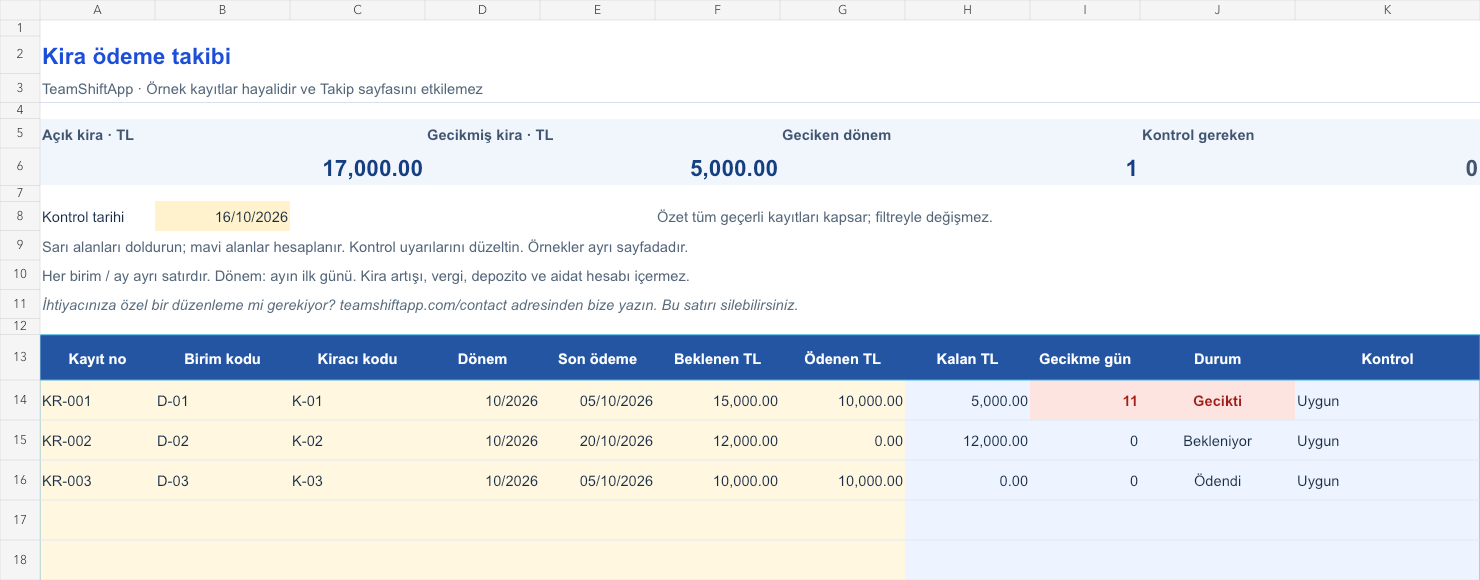
The images below are the actual data entry and executive summary pages of the workbook to be downloaded.

Step by step usage
Examine the example and prepare the blank file
Open a separate line for each unit and rental month followed. Type the same unit code every month; An internal code can be used for the tenant instead of a name. In the Period field, enter the first day of the month as the date; The cell shows the month and year. For example, for October 2026, enter 01.10.2026. The due date is a separate date field. Get the expected amount from the current contract or your own record. The Paid field is the cumulative total distributed for the month; If there is no payment, enter 0. Do not open the same unit and month twice.
Write actual records in the yellow fields
The remaining balance is the expected rent minus the amount paid. The overdue amount on the open amount is the control date minus the positive part of the due date; The last day itself is not considered late. When the remainder is zero, Paid appears. Repeating unit and month, a period date other than the first day of the month, missing numeric amount, or more than expected will raise a payment control warning. The open amount, overdue amount, and number of overdue periods in the current periods are shown at the top. The summary includes period records, not unit counts, and looks at all valid rows.
Fix control alerts and review summary
Verify overdue periods with payment receipts. Reconcile the distribution of a payment over multiple months with your notes. At the end of the period, record the open amounts and keep a copy.
What does this Excel file solve?
Free Excel template that tracks expected monthly rent, amount paid, remaining balance and due date for shops, offices and other rented units. Open a separate line for each unit and rental month followed. Type the same unit code every month; An internal code can be used for the tenant instead of a name. In the Period field, enter the first day of the month as the date; The cell shows the month and year. For example, for October 2026, enter 01.10.2026. The due date is a separate date field. Get the expected amount from the current contract or your own record. The Paid field is the cumulative total distributed for the month; If there is no payment, enter 0. Do not open the same unit and month twice.
What's inside the file?
Rent record on unit and month basis, Partial payment and balance calculation, Same unit/month recheck, Overdue period and open amount summary. The file contains sample rows, canned formulas, data validation fields, risk colorings, and executive summary.
Calculation and control logic
The remaining balance is the expected rent minus the amount paid. The overdue amount on the open amount is the control date minus the positive part of the due date; The last day itself is not considered late. When the remainder is zero, Paid appears. Repeating unit and month, a period date other than the first day of the month, missing numeric amount, or more than expected will raise a payment control warning. The open amount, overdue amount, and number of overdue periods in the current periods are shown at the top. The summary includes period records, not unit counts, and looks at all valid rows.
Worked example: Partial lease payment and open period
Unit: D-01; period: October 2026. Expected: 15,000 TL. Paid: 10,000 TL. Last payment: October 5; check: October 16, 2026. Result: The remaining balance is 5,000 TL and the delay is 11 days. A separate line is opened for November. When the remaining 5,000 TL arrives in October, the amount paid in the October line is changed to 15,000 TL.
Decisions that can be taken as a result of this
Verify overdue periods with payment receipts. Reconcile the distribution of a payment over multiple months with your notes. Record open amounts at the end of the period and keep a copy
Common usage mistakes
Writing the payment for more than one month to a single month. Mixing rent and deposit into the same expected rent amount. Registering the same unit with a different code every month and disabling the replay check
Limits and proper use
The file is for 150 unit-month records; for example, a 12-month tracking of 10 units uses 120 rows. All amounts must be in TL. Rent increase, tax, withholding tax, VAT and contractual provisions are not calculated; You enter the exact amount to be paid yourself. Track deposits, dues, repairs and other transactions with separate records instead of adding them to the rental amount. Since the actual payment history is not kept, viewing the current balance of the past period requires a copy of the file for that day. It does not impose legal deadlines or eviction proceedings.
Compatibility and quality control
Two pages of this file were visually inspected; Formulas were recalculated and checked in empty, sample and incorrect entry scenarios. There was no separate device testing of the Excel desktop application. .xlsx without macro; formulas and drop-down lists are included in the file. The tracking page includes 150 preset record lines and a standalone Sample page. Prepared for desktop Excel; Check views and validations in other spreadsheet applications.
Scope of this file
This file keeps monthly rent records; It does not calculate rent increases, taxes, withholding or eviction periods. Shiftmate is not a real estate management or rent collection system.
Relevant official and technical resources
Frequently asked questions
Is this file for the tenant or lessor?
The expected and paid amount can be used by the monitoring party. Maintain a single point of view for identical volumes in the file; Do not mix your own debt with the amount you will receive from someone else in the same total.
Does it automatically calculate the rent increase?
No. You write down the expected amount based on your own current record. There is no fixed increase rate or legislative assumption in the file.
How should I record a payment if it is for two months?
Distribute the amount among the months it belongs to. Update the total paid in each month's row separately; Do not write off the entire payment in both months.
How many lines are needed for one unit?
One line is used each month. The period date is the first day of the month; The actual due date for payment is entered in a separate field.