Shiftmate
Contract tracking Excel and renewal reminder list
Track supplier, maintenance and service contracts with principal and end date. See remaining days for notification and upcoming renewals with Excel.
Prepared by:Shiftmate Product and Operations Team · Son kontrol:
Actual file previews
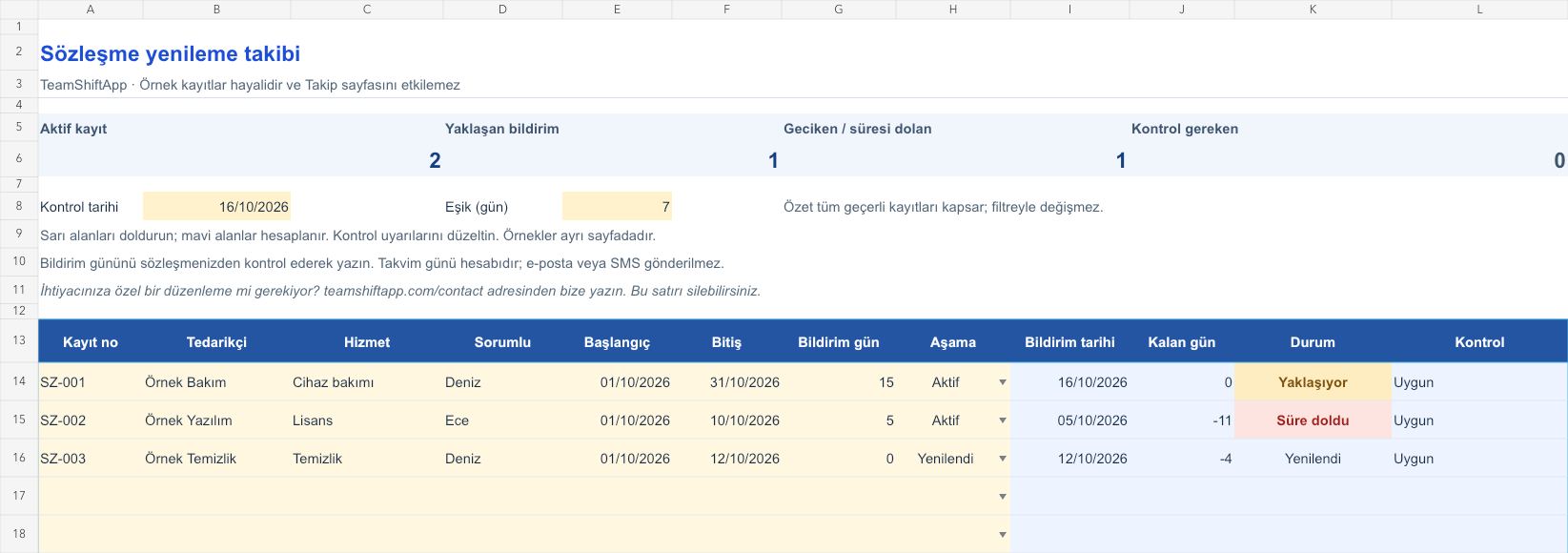
The images below are the actual data entry and executive summary pages of the workbook to be downloaded.

Step by step usage
Examine the example and prepare the blank file
Provide a unique registration number for each contract period. Enter supplier, service, responsible, start and end date. The number of notice days indicates the number of calendar days before the end of the transaction; You determine this by checking your contract. If no notification is required, you can write 0. Select the Active, Renewed, or Closed stage. When the new period starts, change the old row to Refreshed and open a new record for the new date range. The upper threshold determines how many days before the calculated notification day the Approaching warning will be issued.
Write actual records in the yellow fields
The notification date is the subtraction of the entered notification day from the end date. The remaining days are found by subtracting the control date from this date. If the active record has expired, it will show Expired; if the notification date has passed, it will show Notification Delayed; if it is within the upcoming threshold, it will show Upcoming; if it is further ahead, it will show Active. The record selected as Renewed or Closed is subtracted from the upcoming and overdue numbers. It requires checking that the end is before the beginning, negative or fractional notification day, missing responsible and duplicate registration number. Calculation is the calendar day; Weekend and holiday shifting is not allowed.
Fix control alerts and review summary
Review upcoming notifications with the appropriate contact. Open the new period of the renewed contract with a separate record. Keep the record proving that notification was made, independent of the file.
What does this Excel file solve?
Track supplier, maintenance and service contracts with principal and end date. See remaining days for notification and upcoming renewals with Excel. Provide a unique registration number for each contract period. Enter supplier, service, responsible, start and end date. The number of notice days indicates the number of calendar days before the end of the transaction; You determine this by checking your contract. If no notification is required, you can write 0. Select the Active, Renewed, or Closed stage. When the new period starts, change the old row to Refreshed and open a new record for the new date range. The upper threshold determines how many days before the calculated notification day the Approaching warning will be issued.
What's inside the file?
Responsible and supplier fields, End and pre-notification days, Calculated notification date, Upcoming/delayed notification summary. The file contains sample rows, canned formulas, data validation fields, risk colorings, and executive summary.
Calculation and control logic
The notification date is the subtraction of the entered notification day from the end date. The remaining days are found by subtracting the control date from this date. If the active record has expired, it will show Expired; if the notification date has passed, it will show Notification Delayed; if it is within the upcoming threshold, it will show Upcoming; if it is further ahead, it will show Active. The record selected as Renewed or Closed is subtracted from the upcoming and overdue numbers. It requires checking that the end is before the beginning, negative or fractional notification day, missing responsible and duplicate registration number. Calculation is the calendar day; Weekend and holiday shifting is not allowed.
Worked example: Seeing the notification day before the due date
Contract end: 31 October 2026. Notification: 15 days ago. Check date: October 16, 2026. Stage: Active. Result: The notification date is October 16, 2026 and the remaining days are 0. Registration appears as Upcoming. If it is still Active the next day, the Notification will switch to delayed status; The contract itself has not yet expired.
Decisions that can be taken as a result of this
Review upcoming notifications with the appropriate contact. Open the new period of the renewed contract with a separate record. Keep the record proving that notification has been made, independent of the file
Common usage mistakes
Just looking at the end of the contract and forgetting about the preliminary notice day. Writing the renewed period over the dates of the old line and losing the past. Interpreting Excel alert as automatic e-mail sent
Limits and proper use
Provides operational tracking for 150 contract periods. Shows date status only when the file is open and the calculation is refreshed; Does not send email, SMS or phone notifications. It does not determine the legal accuracy of the notice period, does not calculate business days, and does not store the text of the contract. Automatic renewal conditions and the channel through which the notification will be made should also be checked. Summary is independent of filters. Use registration number and short service description instead of confidential contract content.
Compatibility and quality control
Two pages of this file were visually inspected; Formulas were recalculated and checked in empty, sample and incorrect entry scenarios. There was no separate device testing of the Excel desktop application. .xlsx without macro; formulas and drop-down lists are included in the file. The tracking page includes 150 preset record lines and a standalone Sample page. Prepared for desktop Excel; Check views and validations in other spreadsheet applications.
Scope of this file
This file uses the number of days you specify in the contract. Does not send email or phone notifications; It does not determine the legal notice period. Shiftmate is not contract management software.
Relevant official and technical resources
Frequently asked questions
Will I receive an e-mail when the renewal date approaches?
No. There is a color and status alert in Excel. The responsible person must open the file regularly and use his own calendar.
Are notification day and end day the same thing?
It is not. The notification date is calculated by the number of days entered before the end. For example, for an end date of October 31st and 15 days advance notice, the date would be October 16th.
Should I delete the row when the contract is renewed?
Instead of deleting, make the stage Refreshed. Open the new period with the new registration number; thus the dates of the old period remain.
Does he take weekends off?
No. Calendar day calculation. If the contract includes business day or special notice rules, confirm the dates separately with the authorized expert.