Shiftmate
Income and expense tracking Excel template
Track small business revenue and expenses by category, payment channel, document number, period and net impact in one table.
Prepared by:Shiftmate Product and Operations Team · Son kontrol:
Actual file previews
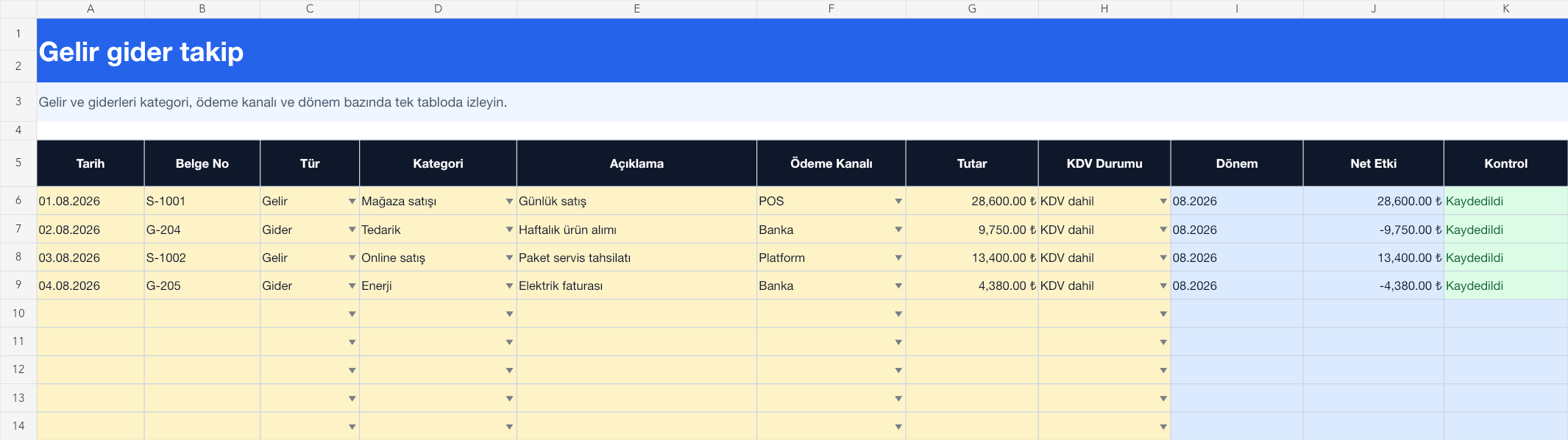
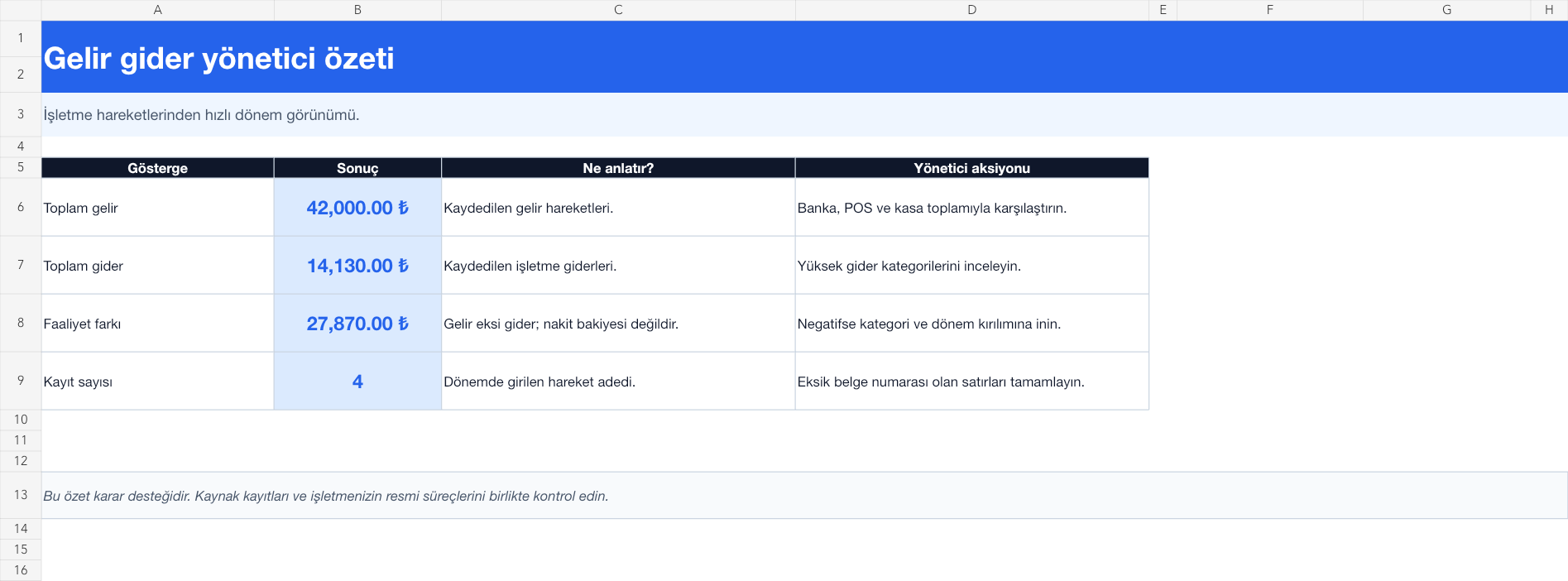
The images below are the actual data entry and executive summary pages of the workbook to be downloaded.
Step by step usage
Prepare the file according to your business
First, clarify the income and expense categories that will be used in your business. On the tracking page, enter the date, document number, type, category, description, payment channel, amount and VAT status for each transaction in the yellow cells. Using cash, POS, bank and platform transactions as separate payment channels makes end-of-period control easier.
Run formulas and checks
The file converts revenue lines to positive and expense lines to negative net effect and produces the month period from the transaction date. The summary page shows total revenue, total expenses, activity variance, and number of records. The activity difference is merely the result of the income minus expenses of the transactions entered; It is not a bank or cash balance. Reconcile bank statement, POS report, cash count and document list at the end of the period.
Turn results into action
Review the indicators on the summary page. Examine the highest expense category. Complete undocumented movements. Match payment channel totals to the source report.
What does this Excel file solve?
Track small business revenue and expenses by category, payment channel, document number, period and net impact in one table. First, clarify the income and expense categories that will be used in your business. On the tracking page, enter the date, document number, type, category, description, payment channel, amount and VAT status for each transaction in the yellow cells. Using cash, POS, bank and platform transactions as separate payment channels makes end-of-period control easier.
What's inside the file?
Income and expense categories, Payment channel record, Automatic net effect, Executive activity summary. The file contains sample rows, canned formulas, data validation fields, risk colorings, and executive summary.
Calculation and control logic
The file converts revenue lines to positive and expense lines to negative net effect and produces the month period from the transaction date. The summary page shows total revenue, total expenses, activity variance, and number of records. The activity difference is merely the result of the income minus expenses of the transactions entered; It is not a bank or cash balance. Reconcile bank statement, POS report, cash count and document list at the end of the period.
Worked example: Monthly operations check in small store
Income: 42,000 TL. Expense: 14.130 TL. 4 document records. Result: The activity difference appears as 27,870 TL. Instead of accepting the figure as profit, the manager checks for missing rent, personnel, or tax records and matches payment channel totals with source reports.
Decisions that can be taken as a result of this
Examine the highest expense category. Complete undocumented movements. Match payment channel totals to source report
Common usage mistakes
Considering the cash balance as income. Writing the same transaction twice, both as POS and bank collection. Mixing amounts including and excluding VAT without explanation
Limits and proper use
The template provides daily business visibility; It does not create an official accounting voucher, tax return, balance sheet or income statement. Align category and VAT application with your financial advisor's registration scheme.
Compatibility and quality control
All 67 workbooks underwent formula error scanning, recalculation checking, and page-by-page visual inspection. Standard .xlsx file; Does not contain macros or external links. Formulas and data validation fields run inside the file. It is recommended that you keep the original file and work on a separate copy for your business.
Transitioning from Excel to automation
Use the file to solve your small business operation need immediately. When registration and approval traffic grows, move the same process to the Shiftmate workspace.
Relevant official and technical resources
Frequently asked questions
Are the income and expense statement and the cash book the same thing?
No. The cash book tracks the physical cash inflow and outflow and the amount remaining in the cash register. This file classifies business income and expense transactions across different channels, including cash, POS, bank and platform.
On what date should the credit card sale be recorded?
Track the sales date for operational analysis and the transfer date to the bank for the cash plan in separate processes. Do not change the method you use in this file during the period and indicate it in the description.
Is the operating difference a net profit?
No. It is simply the income entered in the file minus the expenses entered; taxes, depreciation, accruals and missing costs may change the outcome.