Shiftmate
Current account tracking Excel template
Monitor customer and supplier debt, collection, maturity and open balance movements in a single current account statement.
Prepared by:Shiftmate Product and Operations Team · Son kontrol:
Actual file previews
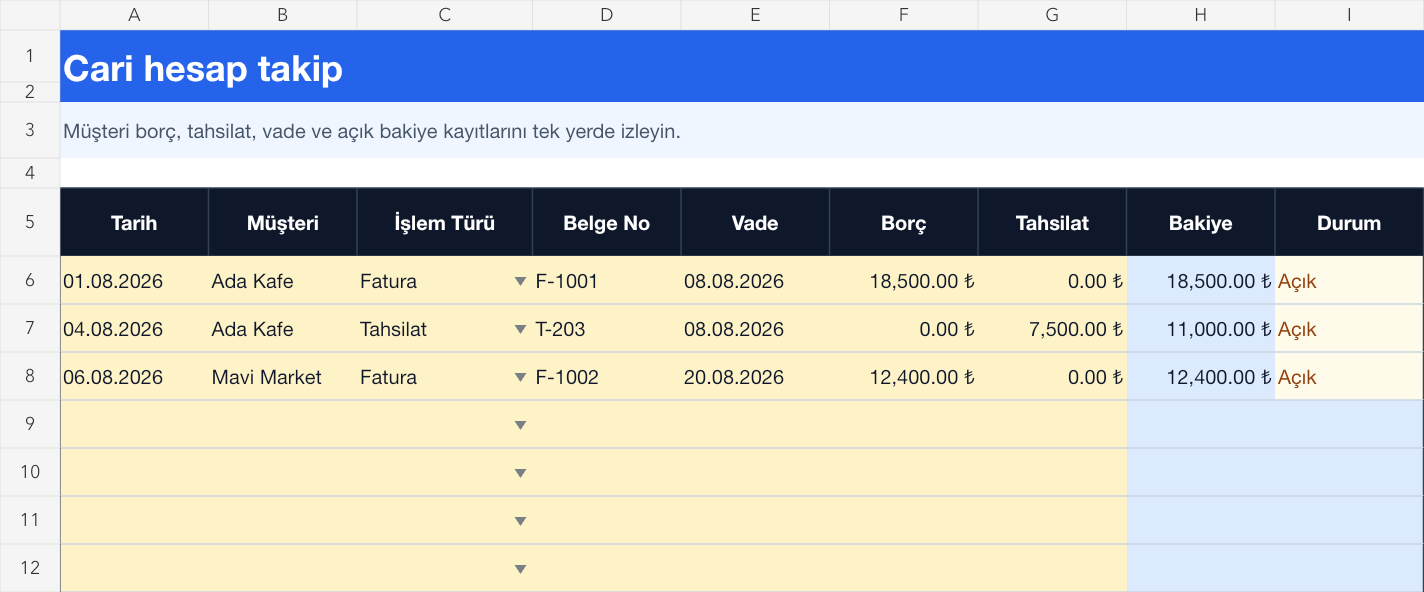
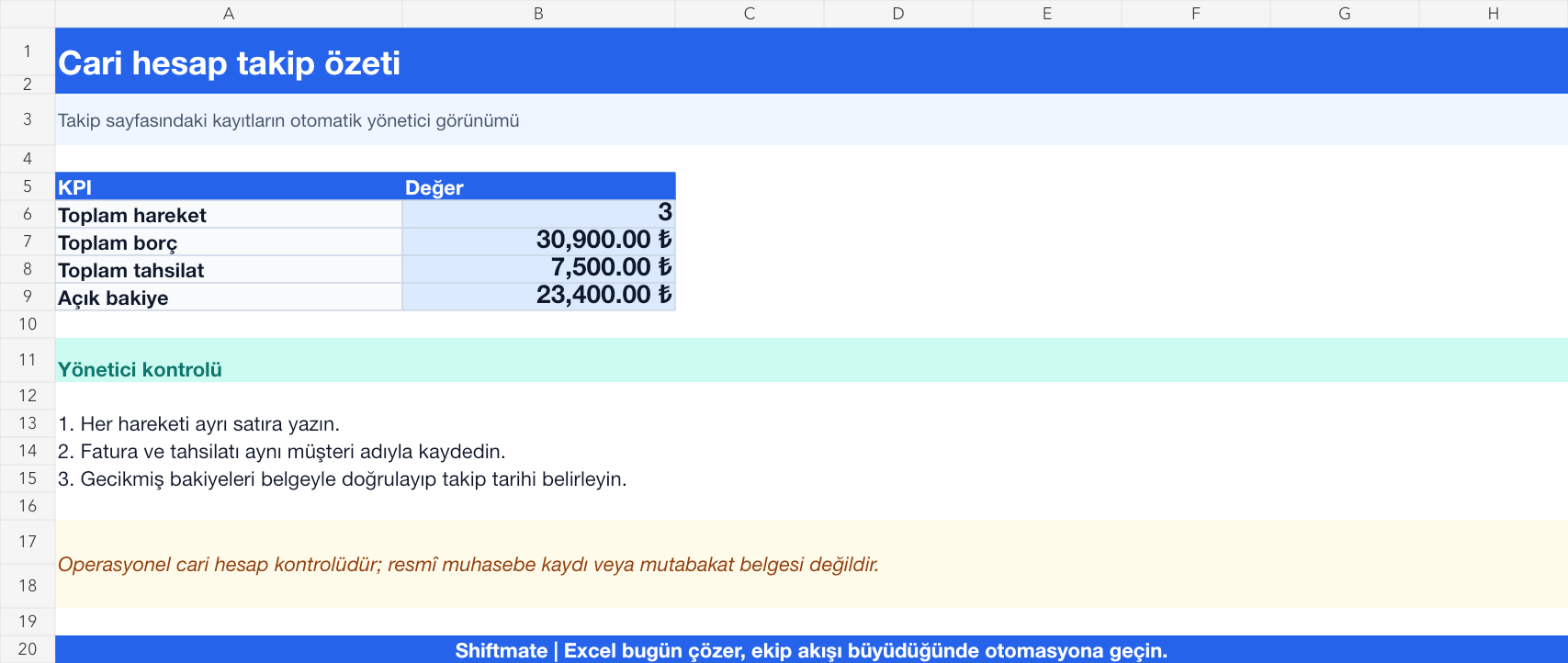
The images below are the actual data entry and executive summary pages of the workbook to be downloaded.
Step by step usage
Prepare the file according to your business
Record the current code, transaction date, document number, maturity, debt and collection amount for each customer or supplier on a separate line. Do not use different name spellings for the same client; Establish a single code scheme that matches bank and cash registers.
Run formulas and checks
The line balance is calculated by subtracting the collection from the debt. The summary page brings together total debt, collections, and open balance; Transactions that are overdue but have not been paid off are transferred to collection control. Reconcile the transaction total with the source record by entering the beginning of the period turnover with the separate document number.
Turn results into action
Review the indicators on the summary page. Keep past due balances and prioritize by age. Match the collection with the relevant document and current code. Instead of deleting the disputed transaction, separate it with description and status.
What does this Excel file solve?
Monitor customer and supplier debt, collection, maturity and open balance movements in a single current account statement. Record the current code, transaction date, document number, maturity, debt and collection amount for each customer or supplier on a separate line. Do not use different name spellings for the same client; Establish a single code scheme that matches bank and cash registers.
What's inside the file?
Debt and collection records, Automatic open balance, Maturity and delay warning, Executive collection summary. The file contains sample rows, canned formulas, data validation fields, risk colorings, and executive summary.
Calculation and control logic
The line balance is calculated by subtracting the collection from the debt. The summary page brings together total debt, collections, and open balance; Transactions that are overdue but have not been paid off are transferred to collection control. Reconcile the transaction total with the source record by entering the beginning of the period turnover with the separate document number.
Worked example: Weekly collections check for three customers
Total debt: 30,900 TL. Collection: 7,500 TL. Open balance: 23.400 TL. Result: The overdue open transaction appears in the executive summary; The customer is called, the payment promise is noted and the actual collection is added as a new transaction.
Decisions that can be taken as a result of this
Keep past due balances and prioritize by age. Match the collection with the relevant document and current code. Separate disputed transaction with description and status rather than deleting it
Common usage mistakes
Mixing debit and credit direction according to current type. Writing the collection over the old debit line. Covering the bank deduction or discount difference without explanation
Limits and proper use
This template is an operational current account and collections view; It is not a formal accounting ledger, e-invoice system or independent financial record. Reconcile accounting, bank and cash records at the end of the period.
Compatibility and quality control
All 67 workbooks underwent formula error scanning, recalculation checking, and page-by-page visual inspection. Standard .xlsx file; Does not contain macros or external links. Formulas and data validation fields run inside the file. It is recommended that you keep the original file and work on a separate copy for your business.
Transitioning from Excel to automation
Use the file to solve your small business operation need immediately. When registration and approval traffic grows, move the same process to the Shiftmate workspace.
Frequently asked questions
How to track multiple invoices of a customer?
Enter each invoice with a separate line and document number. Record the partial collection on a new line and specify the relevant invoice in the description; thus, transaction history is preserved.
Why might the current balance appear differently in the accounting program?
Beginning of period transfer, refund, discount, bank deduction or unprocessed collection may be missing. Before closing the difference, reconcile document-by-document with the same date range and the same current code.