Shiftmate
Check bill tracking Excel and maturity control table
Track received and issued checks and bills with separate totals. Turkish Excel file without macros showing open amount, upcoming maturity and delay.
Prepared by:Shiftmate Product and Operations Team · Son kontrol:
Actual file previews
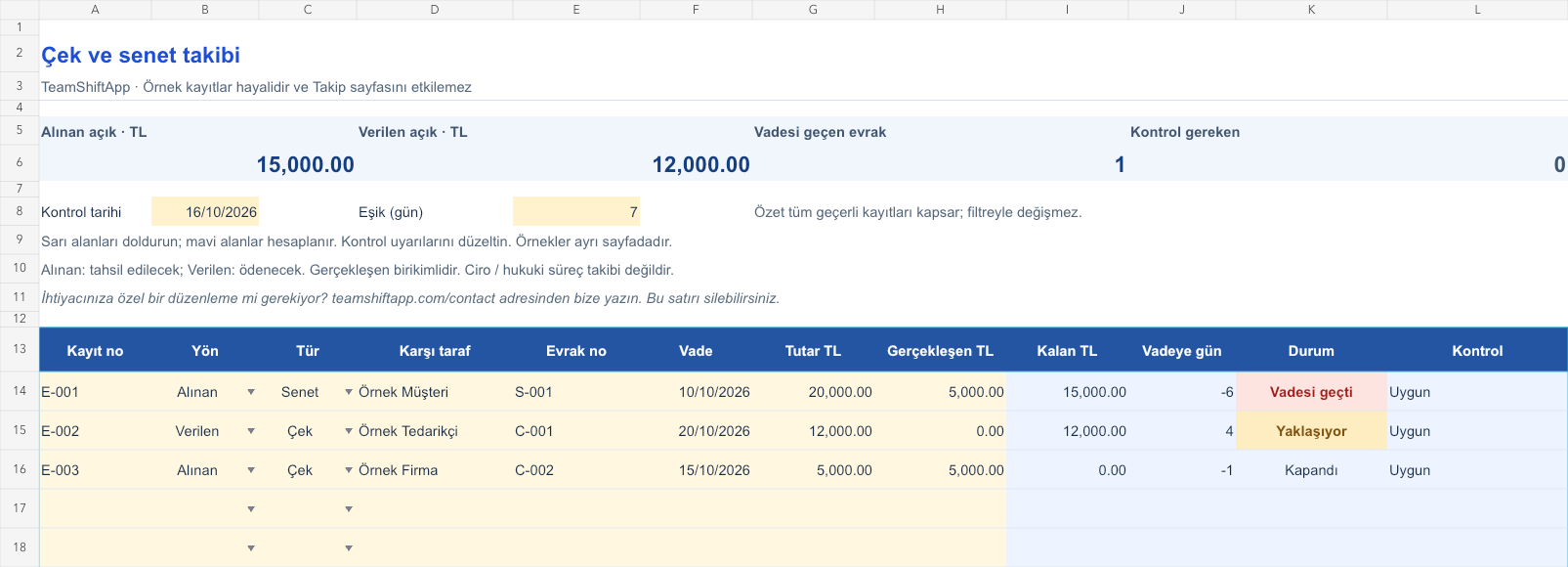
The images below are the actual data entry and executive summary pages of the workbook to be downloaded.

Step by step usage
Examine the example and prepare the blank file
Write only one document on a line. The record number must be unique within the file; The document's own number is kept separately. In the Direction field, select Received for the documents that will be paid to you, or Given for the documents that you will pay. In the Type field, use Check or Bill of Exchange. Enter the counterparty, document number, maturity date and total TL amount. In the Actual field, enter the cumulative collected or paid amount; If there is no action, enter 0. For regular checking, review the control date above and the upcoming maturity threshold.
Write actual records in the yellow fields
The remaining amount is the total amount minus the actual amount. Day calculation is the maturity minus the control date; A negative result indicates that the due date has passed. Closed appears when the remaining amount is zero. If the maturity date in the open record is overdue, it gets the status Overdue, if it is within the threshold, it gets the status Approaching, if it is beyond the threshold, it gets the status Open. The summary above collects the open amounts received and given in two separate indicators; it doesn't combine them like a single cash balance. If the same number is used twice, the direction is not selected, or the actual amount exceeds the total, the record requests control and is not included in these accounts.
Fix control alerts and review summary
Compare the upcoming paperwork with your payment plan. Verify overdue received documents with bank and customer records. Update the actual total when the document is closed.
What does this Excel file solve?
Track received and issued checks and bills with separate totals. Turkish Excel file without macros showing open amount, upcoming maturity and delay. Write only one document on a line. The record number must be unique within the file; The document's own number is kept separately. In the Direction field, select Received for the documents that will be paid to you, or Given for the documents that you will pay. In the Type field, use Check or Bill of Exchange. Enter the counterparty, document number, maturity date and total TL amount. In the Actual field, enter the cumulative collected or paid amount; If there is no action, enter 0. For regular checking, review the control date above and the upcoming maturity threshold.
What's inside the file?
Separation of documents received and given, Check / bill of exchange and document number, Remaining amount and due date calculation, Overdue open document warning. The file contains sample rows, canned formulas, data validation fields, risk colorings, and executive summary.
Calculation and control logic
The remaining amount is the total amount minus the actual amount. Day calculation is the maturity minus the control date; A negative result indicates that the due date has passed. Closed appears when the remaining amount is zero. If the maturity date in the open record is overdue, it gets the status Overdue, if it is within the threshold, it gets the status Approaching, if it is beyond the threshold, it gets the status Open. The summary above collects the open amounts received and given in two separate indicators; it doesn't combine them like a single cash balance. If the same number is used twice, the direction is not selected, or the actual amount exceeds the total, the record requests control and is not included in these accounts.
Worked example: Seeing documents in two directions separately
Note received: 20,000 TL; realized: 5,000 TL. Check given: 12,000 TL; realized: 0 TL. Maturity of the bill received: October 10; control: October 16, 2026. Result: The open amount received appears separately as 15,000 TL and the open amount given as 12,000 TL. The days remaining to maturity on the bill received are -6 and the status is Overdue.
Decisions that can be taken as a result of this
Compare the upcoming paperwork with your payment plan. Verify overdue received documents with bank and customer records. Update the actual total when the document is closed
Common usage mistakes
Adding the amount received and the amount given and mistaking it for cash money. Closing the endorsed document as if it had been collected. Re-opening the same document with the new registration number
Limits and proper use
The file is just simple paperwork and actual amount tracking. It does not keep a full history of turnover, guarantees, non-refundability, protests and legal proceedings. Keep track of such documents separately with the records of your bank or authorized specialist. The entered maturity requires contract and document control; day account is not a legal last day account. Only use TL records together. The 150-line summary is based on all valid records, not the visible filter; There is no bank connection.
Compatibility and quality control
Two pages of this file were visually inspected; Formulas were recalculated and checked in empty, sample and incorrect entry scenarios. There was no separate device testing of the Excel desktop application. .xlsx without macro; formulas and drop-down lists are included in the file. The tracking page includes 150 preset record lines and a standalone Sample page. Prepared for desktop Excel; Check views and validations in other spreadsheet applications.
Scope of this file
This file is a list of documents; The bank does not provide turnover chain, protest or legal time management. Shiftmate app does not collect checks or make payments.
Relevant official and technical resources
Frequently asked questions
Can the received and issued checks be kept in the same file?
Yes. That's what the direction drop-down list and two separate open amount sums are for. The document received is the amount to be collected, the document given is the amount to be paid.
Does it keep track of the endorsed check?
The turnover chain or remaining legal liability is not calculated. Do not write the turnover as an actual collection; Such a workflow requires detailed document management.
How many days is the upcoming maturity date?
The starting threshold is 7 days and can be changed in the Threshold (days) cell at the top. The maturity date is also included in the upcoming group; Past dates are notified separately.
Does the bank update automatically?
No. You manually update the actual amount according to your own bank or payment record. The file does not make payments or collections.