Shiftmate
Monthly payment tracking spreadsheet Excel
Manage rent, supplier, tax, subscription and other regular payments with due date, amount paid and remaining balance.
Prepared by:Shiftmate Product and Operations Team · Son kontrol:
Actual file previews
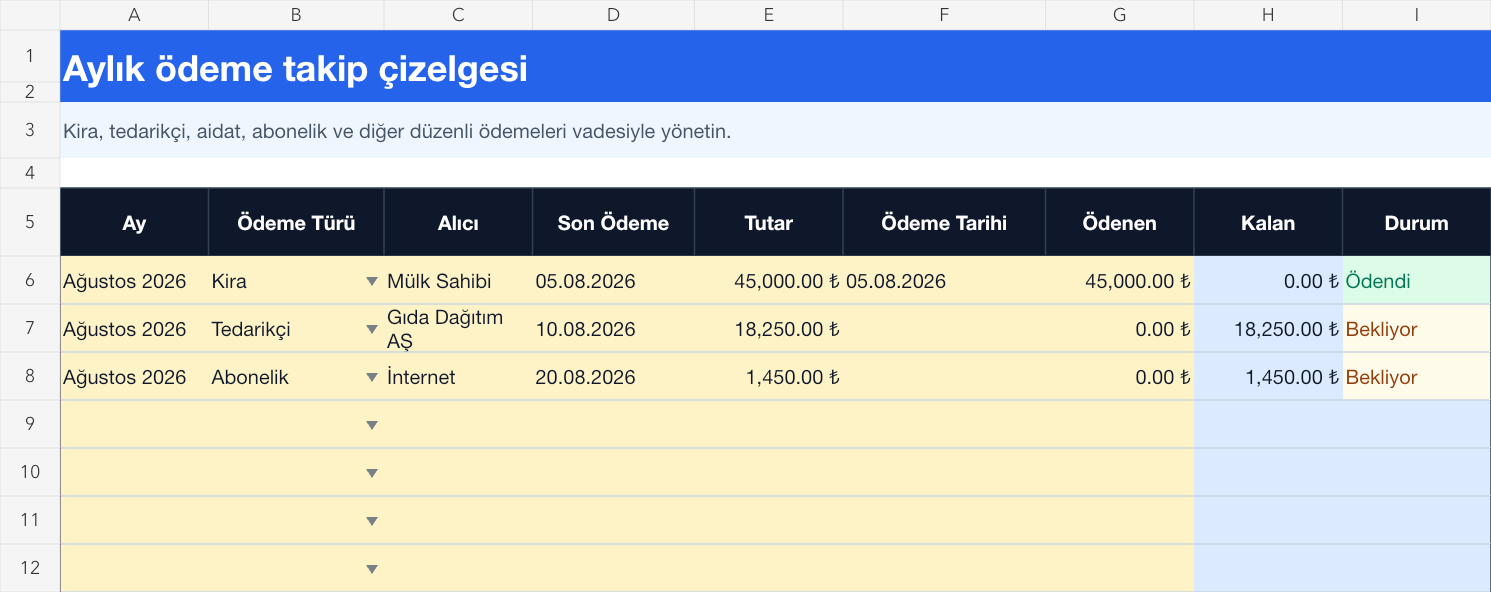
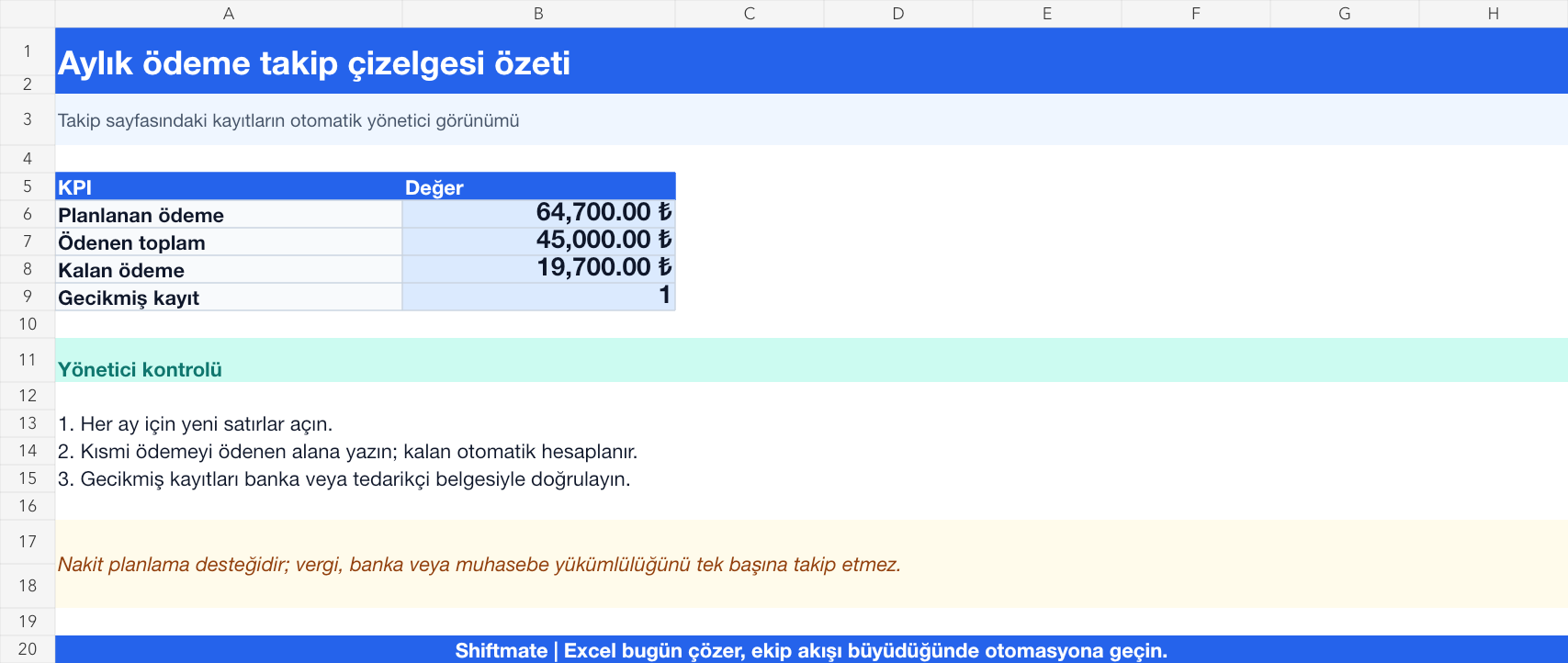
The images below are the actual data entry and executive summary pages of the workbook to be downloaded.
Step by step usage
Prepare the file according to your business
Enter the month, payment category, payee, description, scheduled amount, payment due date, actual payment, and payment date. Use fixed category names for recurring items such as rent, taxes, suppliers, credits, and subscriptions.
Run formulas and checks
The remaining amount is the scheduled payment minus the actual payment. Records whose payment due date has passed and whose remaining amount is greater than zero are marked as overdue. See not only the cash outflow but also the upcoming liability by reading the planned, paid, and remaining total together on the summary page.
Turn results into action
Review the indicators on the summary page. Set aside cash for payments for the next seven days. Record the partial payment with the actual amount and date. Review auto-renewing subscriptions periodically.
What does this Excel file solve?
Manage rent, supplier, tax, subscription and other regular payments with due date, amount paid and remaining balance. Enter the month, payment category, payee, description, scheduled amount, payment due date, actual payment, and payment date. Use fixed category names for recurring items such as rent, taxes, suppliers, credits, and subscriptions.
What's inside the file?
Monthly payment calendar, Planned and paid amount, Remaining balance calculation, Overdue payment warning. The file contains sample rows, canned formulas, data validation fields, risk colorings, and executive summary.
Calculation and control logic
The remaining amount is the scheduled payment minus the actual payment. Records whose payment due date has passed and whose remaining amount is greater than zero are marked as overdue. See not only the cash outflow but also the upcoming liability by reading the planned, paid, and remaining total together on the summary page.
Worked example: August payment schedule
Planned: 64.700 TL. Paid: 45,000 TL. Remaining: 19.700 TL. Result: A supplier payment appears in red because it is overdue; the manager clarifies the payment date and reorders other items in the cash plan.
Decisions that can be taken as a result of this
Set aside cash for payments for the next seven days. Record the partial payment with the actual amount and date. Review auto-renewing subscriptions periodically
Common usage mistakes
Confusing the invoice date with the payment due date. Mark the partial payment as fully paid. Leaving the old amount and date when copying the same recurring payment
Limits and proper use
Helps file cash flow forecasting and payment control; It does not give bank instructions, does not produce a tax calendar, and does not replace an accounting record. Verify the document for the exact amount and maturity.
Compatibility and quality control
All 67 workbooks underwent formula error scanning, recalculation checking, and page-by-page visual inspection. Standard .xlsx file; Does not contain macros or external links. Formulas and data validation fields run inside the file. It is recommended that you keep the original file and work on a separate copy for your business.
Transitioning from Excel to automation
Use the file to solve your small business operation need immediately. When registration and approval traffic grows, move the same process to the Shiftmate workspace.
Frequently asked questions
Should I open a separate file for each month?
You can use the month field in a single file and create an annual archive copy as the period grows. To keep the summary accurate, do not change the category and date format.
What does the remaining amount look like when a partial payment is made?
Write the paid portion in the Actual payment field; The remaining amount is calculated automatically. When the next payment occurs, update the total paid and add the memo reference to the description.