Shiftmate
Cafe and restaurant cleaning schedule Excel
Record area, task, frequency, responsible, completion and manager verification by shift.
Prepared by:Shiftmate Product and Operations Team · Son kontrol:
Actual file previews
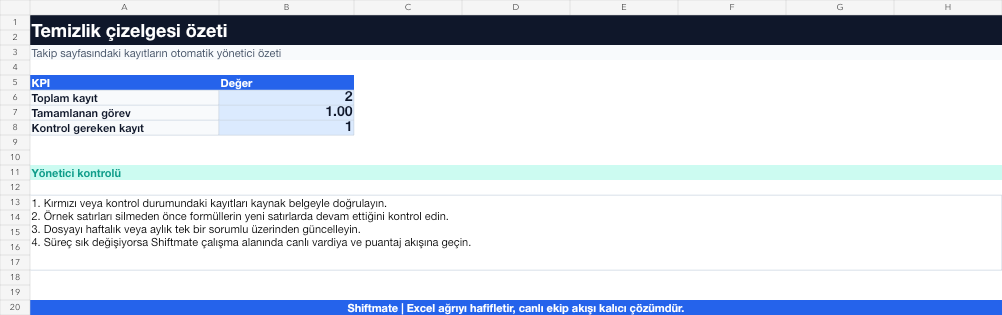
The images below are the actual data entry and executive summary pages of the workbook to be downloaded.

Step by step usage
Prepare the file according to your business
Area, surface or equipment; Identify the work to be done, the frequency, the shift, the method to be used, the employee responsible, and the verifying manager.
Run formulas and checks
Completion status is tracked by task, date and shift. Missing or unverified critical food contact surface tasks are prioritized separately from general cleaning tasks.
Turn results into action
Review the indicators on the summary page. Mark the food contact surface critically. Determine frequency based on use and risk. Distinguish between completer and confirmer.
What does this Excel file solve?
Record area, task, frequency, responsible, completion and manager verification by shift. Area, surface or equipment; Identify the work to be done, the frequency, the shift, the method to be used, the employee responsible, and the verifying manager.
What's inside the file?
Area and task list, Frequency and shift, Responsible employee, Verification status. The file contains sample rows, canned formulas, data validation fields, risk colorings, and executive summary.
Calculation and control logic
Completion status is tracked by task, date and shift. Missing or unverified critical food contact surface tasks are prioritized separately from general cleaning tasks.
Worked example: Closing cleaning round
36 missions. 34 completed. Missing: slicer and cold prep counter. Result: Two pieces of food contact equipment appear missing; Cleanup is completed before the team shuts down and admin verification is recorded.
Decisions that can be taken as a result of this
Mark the food contact surface critically. Determine frequency based on use and risk. Separate completer from confirmer
Common usage mistakes
Writing clean only vaguely with the domain name. Detaching chemical or method instructions from the procedure. Giving mass approval even though it is not completed
Limits and proper use
The chart is the recording layer of the hygiene plan; Also follow chemical safety, training and local food code requirements.
Compatibility and quality control
All 67 workbooks underwent formula error scanning, recalculation checking, and page-by-page visual inspection. Standard .xlsx file; Does not contain macros or external links. Formulas and data validation fields run inside the file. It is recommended that you keep the original file and work on a separate copy for your business.
Transitioning from Excel to automation
Use the file to solve restaurant operation needs immediately. When registration and approval traffic grows, move the same process to the Shiftmate workspace.
Relevant official and technical resources
Frequently asked questions
Should every task be verified by the administrator?
Take a risk-based approach. Critical food contact surfaces and recurring problems require stronger verification.
How to determine cleaning frequency?
Determine based on surface contact with food, intensity of use, risk of contamination and operating procedure.