Shiftmate
Customer tracking program Excel CRM template
Track leads, offer stage, opportunity amount, win probability, and next conversation in a simple CRM table.
Prepared by:Shiftmate Product and Operations Team · Son kontrol:
Actual file previews
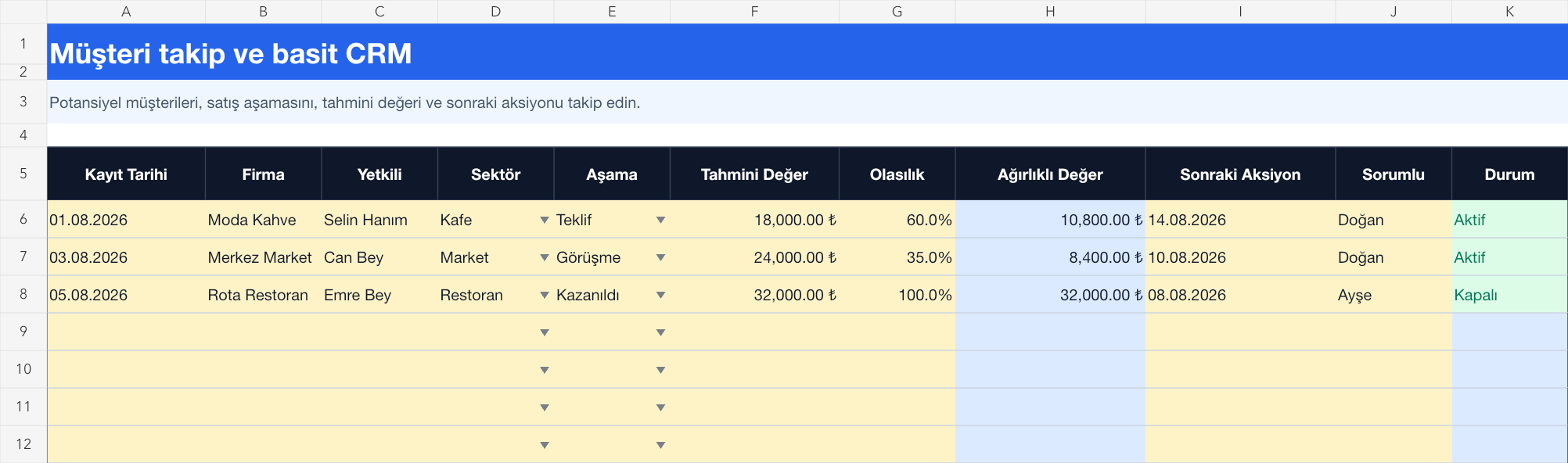
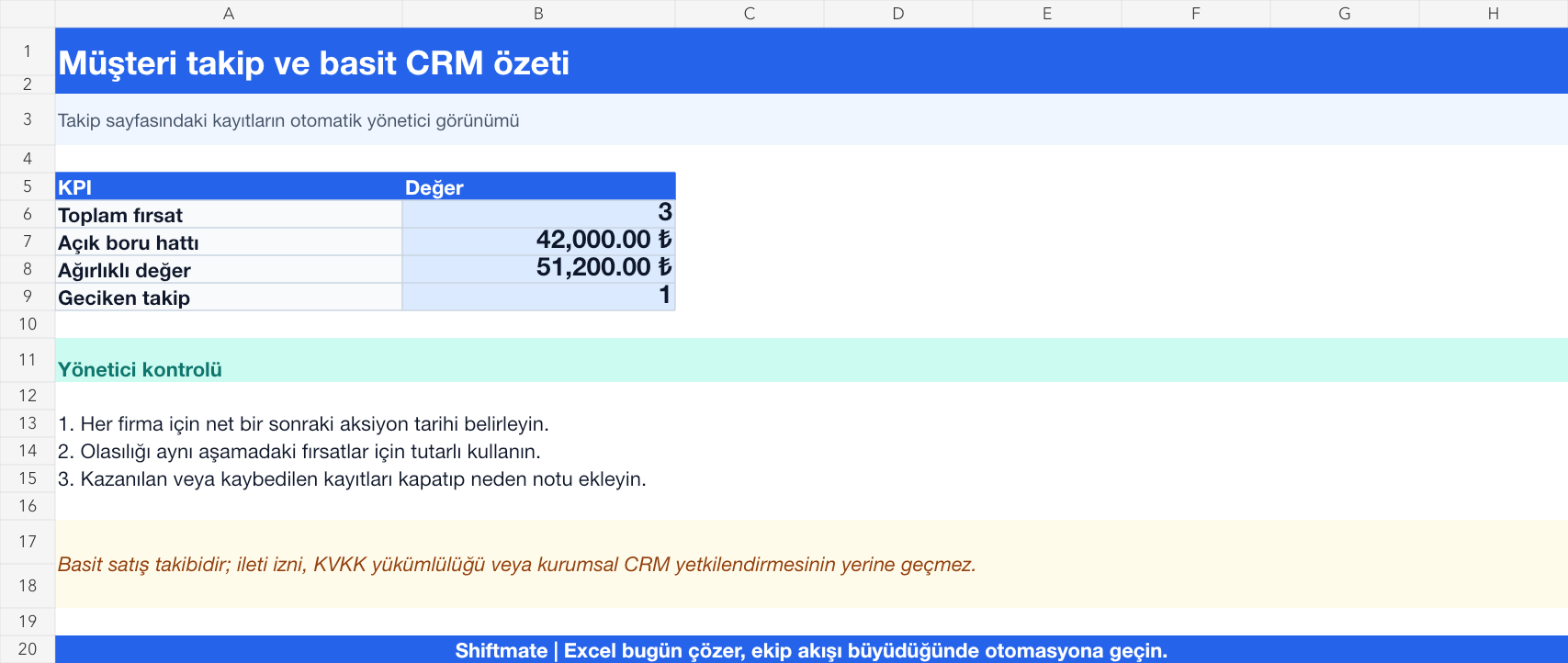
The images below are the actual data entry and executive summary pages of the workbook to be downloaded.
Step by step usage
Prepare the file according to your business
For each lead, record the company, contact, contact channel, need, sales stage, estimated value, probability of winning, responsible person, and next contact date. Do not re-open the same opportunity under different names.
Run formulas and checks
The weighted opportunity value is the estimated amount multiplied by the probability of winning. If the next contact date has passed but the opportunity has not closed, registration appears late. Evaluate the pipeline not only by total amount but also by stage, probability and number of inactive days.
Turn results into action
Review the indicators on the summary page. Add overdue follow-ups to your daily work list. Set clear progress benchmarks for each stage. Record lost opportunity reasons with standard options.
What does this Excel file solve?
Track leads, offer stage, opportunity amount, win probability, and next conversation in a simple CRM table. For each lead, record the company, contact, contact channel, need, sales stage, estimated value, probability of winning, responsible person, and next contact date. Do not re-open the same opportunity under different names.
What's inside the file?
Customer and opportunity list, Sales stage, Weighted opportunity value, Overdue follow-up alert. The file contains sample rows, canned formulas, data validation fields, risk colorings, and executive summary.
Calculation and control logic
The weighted opportunity value is the estimated amount multiplied by the probability of winning. If the next contact date has passed but the opportunity has not closed, registration appears late. Evaluate the pipeline not only by total amount but also by stage, probability and number of inactive days.
Worked example: Weekly sales call
3 open opportunities. Open pipeline: 42,000 TL. Weighted value: 51,200 TL. Result: The opportunity whose next meeting is delayed comes to the fore; The responsible person updates the contact plan and re-evaluates the unrealistic probability value.
Decisions that can be taken as a result of this
Add overdue follow-ups to your daily work list. Set clear progress benchmarks for each stage. Record lost opportunity reasons with standard options
Common usage mistakes
Opening each conversation as a new customer record. Keeping the probability high without evidence. Sharing phone and personal notes without access control
Limits and proper use
The template is a starter CRM for a small sales pipeline; It does not provide automatic email, role-based authorization, activity history, or multi-user concurrent operation. Keep personal data purpose-bound and secure.
Compatibility and quality control
All 67 workbooks underwent formula error scanning, recalculation checking, and page-by-page visual inspection. Standard .xlsx file; Does not contain macros or external links. Formulas and data validation fields run inside the file. It is recommended that you keep the original file and work on a separate copy for your business.
Transitioning from Excel to automation
Use the file to solve your small business operation need immediately. When registration and approval traffic grows, move the same process to the Shiftmate workspace.
Relevant official and technical resources
Frequently asked questions
How should I determine sales milestones?
Choose a small number of stages your team actually uses, such as first contact, need clarified, offer, evaluation, won and lost; Put the conditions for transition to each stage in writing.
Is it safe to keep customer data in Excel?
Limit access to essential individuals, avoid collecting unnecessary personal data, and set your retention period. Consider an authorized system for sensitive data and broad team use.