Shiftmate
Photographer job and delivery tracking Excel template
Keep track of shooting, editing target and actual delivery date. Free Excel showing delinquency and payment balance for photo studios.
Prepared by:Shiftmate Product and Operations Team · Son kontrol:
Actual file previews
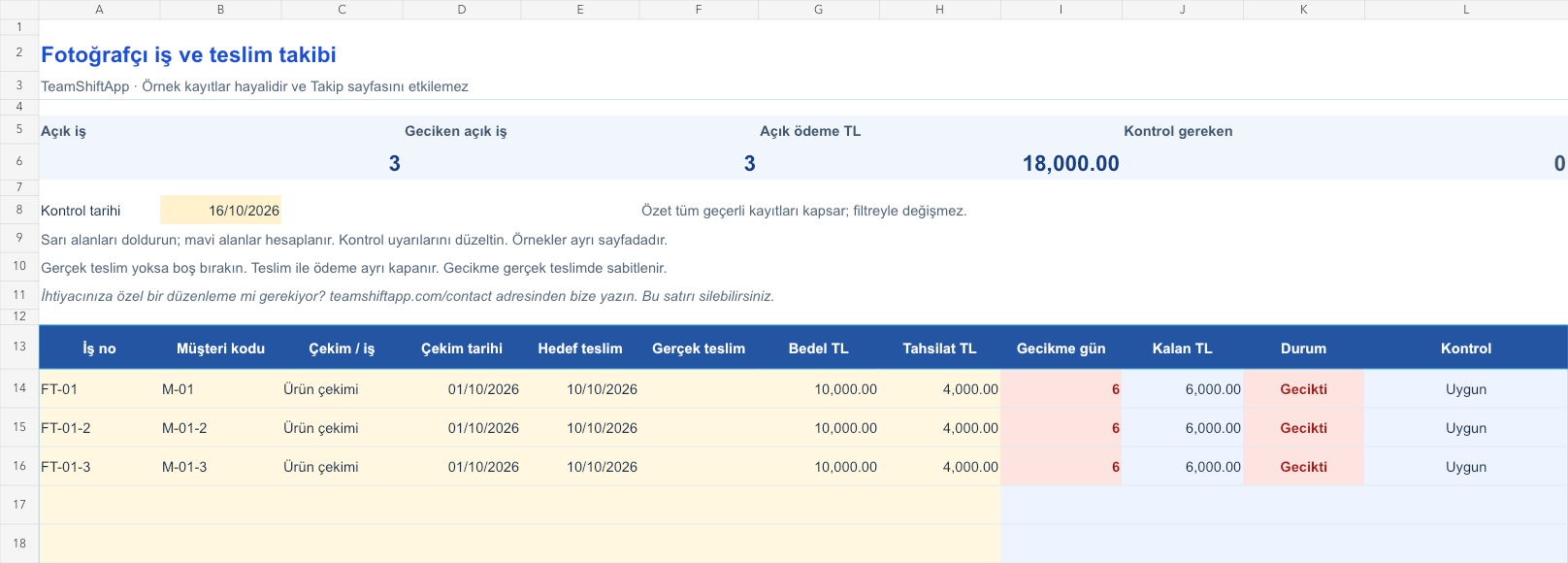
The images below are the actual data entry and executive summary pages of the workbook to be downloaded.

Step by step usage
Examine the example and prepare the blank file
Get the shooting and target delivery date from the agreement. Populate the actual delivery field when the files are delivered to the customer; If it hasn't been delivered yet, leave it blank. You can use code instead of customer name. If the additional deliveries in the package are on different dates, open separate business records and distribute the price without double counting. Use the yellow input fields on the tracking page; Do not change the blue formula fields. The sample sheet is filled with fictitious records and does not count towards the actual work total.
Write actual records in the yellow fields
The delay in the open job is the control date minus the positive part of the target date. Once the actual delivery is entered, the delay is fixed according to the actual date. The stage is shown as Delivered, Overdue, or Preparing. Payment balance is the job price minus collections. Being delivered does not mean that the payment is completed. If the date order is broken or the delivery is in the future, a control warning occurs. An empty mandatory field is distinguished from a real zero. Correct missing or incorrect records in the control column; Since these lines are excluded from the summary, do not use the total as a final report until the problem is resolved.
Fix control alerts and review summary
Prioritize overdue editing tasks. Verify delivery and payment closing separately.
What does this Excel file solve?
Keep track of shooting, editing target and actual delivery date. Free Excel showing delinquency and payment balance for photo studios. Get the shooting and target delivery date from the agreement. Populate the actual delivery field when the files are delivered to the customer; If it hasn't been delivered yet, leave it blank. You can use code instead of customer name. If the additional deliveries in the package are on different dates, open separate business records and distribute the price without double counting. Use the yellow input fields on the tracking page; Do not change the blue formula fields. The sample sheet is filled with fictitious records and does not count towards the actual work total.
What's inside the file?
Delivery delay, Open payment, Delivery phase. The file contains sample rows, canned formulas, data validation fields, risk colorings, and executive summary.
Calculation and control logic
The delay in the open job is the control date minus the positive part of the target date. Once the actual delivery is entered, the delay is fixed according to the actual date. The stage is shown as Delivered, Overdue, or Preparing. Payment balance is the job price minus collections. Being delivered does not mean that the payment is completed. If the date order is broken or the delivery is in the future, a control warning occurs. An empty mandatory field is distinguished from a real zero. Correct missing or incorrect records in the control column; Since these lines are excluded from the summary, do not use the total as a final report until the problem is resolved.
Worked example: Photographer job and delivery tracking: calculation example
Shooting is October 1, 2026. Target delivery is October 10, no delivery yet. 10,000 TL fee, 4,000 TL collection; check 16 October. Result: The job is 6 days late and there is a payment balance of 6,000 TL.
Decisions that can be taken as a result of this
Prioritize overdue editing tasks. Verify delivery and payment closing separately
Common usage mistakes
Writing the shooting date instead of the delivery date. Considering the preparation of the delivery link as delivered to the customer. Using the summary total as the final result without correcting the lines with control warnings
Limits and proper use
It does not include file storage, galleries, revision history or customer approval. The delivery date should represent the completion point agreed with the customer. Does not store media or sensitive personal information. The file is prepared for 150 record lines. The parent summary includes all valid rows, regardless of filters. When capacity is full, open a new period copy; additional rows require the summary and validation ranges to be updated as well. There are no macros, external data connections or automatic notifications.
Compatibility and quality control
Two pages of this file were visually inspected; Formulas were recalculated and checked in empty, sample and incorrect entry scenarios. There was no separate device testing of the Excel desktop application. .xlsx without macro; formulas and drop-down lists are included in the file. The tracking page includes 150 preset record lines and a standalone Sample page. Prepared for desktop Excel; Check views and validations in other spreadsheet applications.
Scope of this file
This independent file is prepared for photographer work and delivery tracking. It's not that Shiftmate automates this industry workflow; The application focuses on team, shift and timesheet management.
Relevant official and technical resources
Frequently asked questions
Will the delay be lost if the work is delivered late?
No. When the actual delivery is written, the delay relative to the target is fixed at that date; Removes from open job list.
What if the album and digital file are separate?
You can open separate business records. Do not repeat the total contract price in full on two lines.
Will the link be sent to the customer automatically?
No. This is Excel tracking file; does not offer gallery or email services.
Do I need to create an account to download the file?
No. You can download the Excel file directly after creating a download request with your email address. Creating a workspace is not mandatory. If there is an area that does not meet your needs, you can request an edit via the contact form.