Shiftmate
Appointment tracking Excel spreadsheet
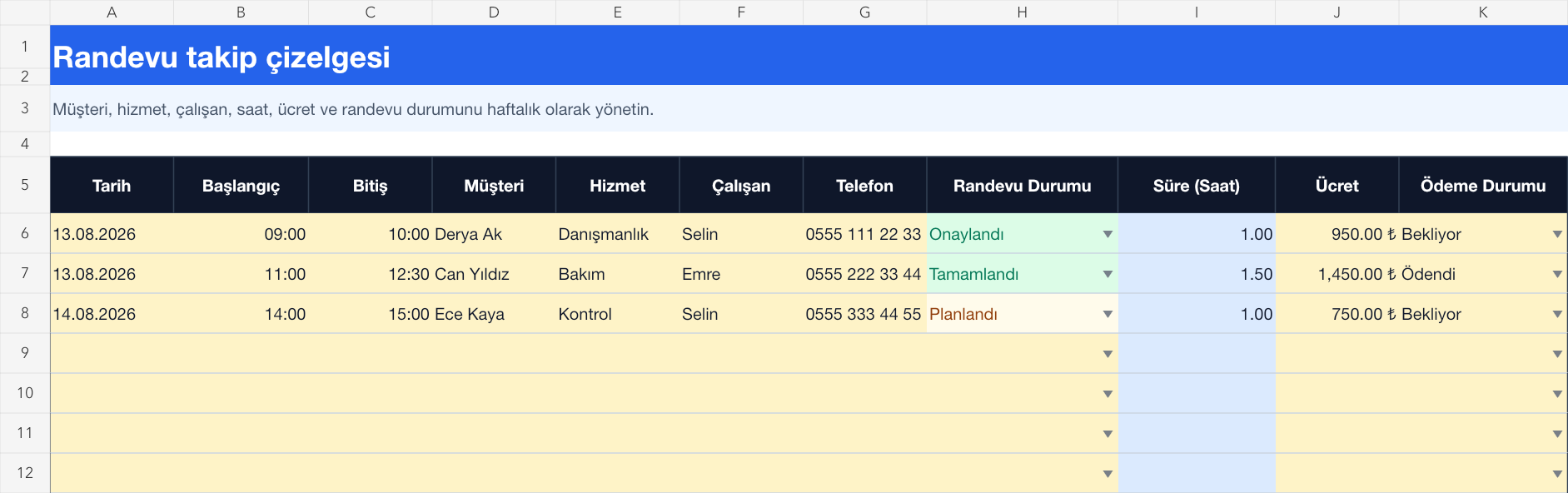
Organize date, time, customer, service, responsible employee, appointment status and payment information in the weekly table.
Prepared by:Shiftmate Product and Operations Team · Son kontrol:
Actual file previews
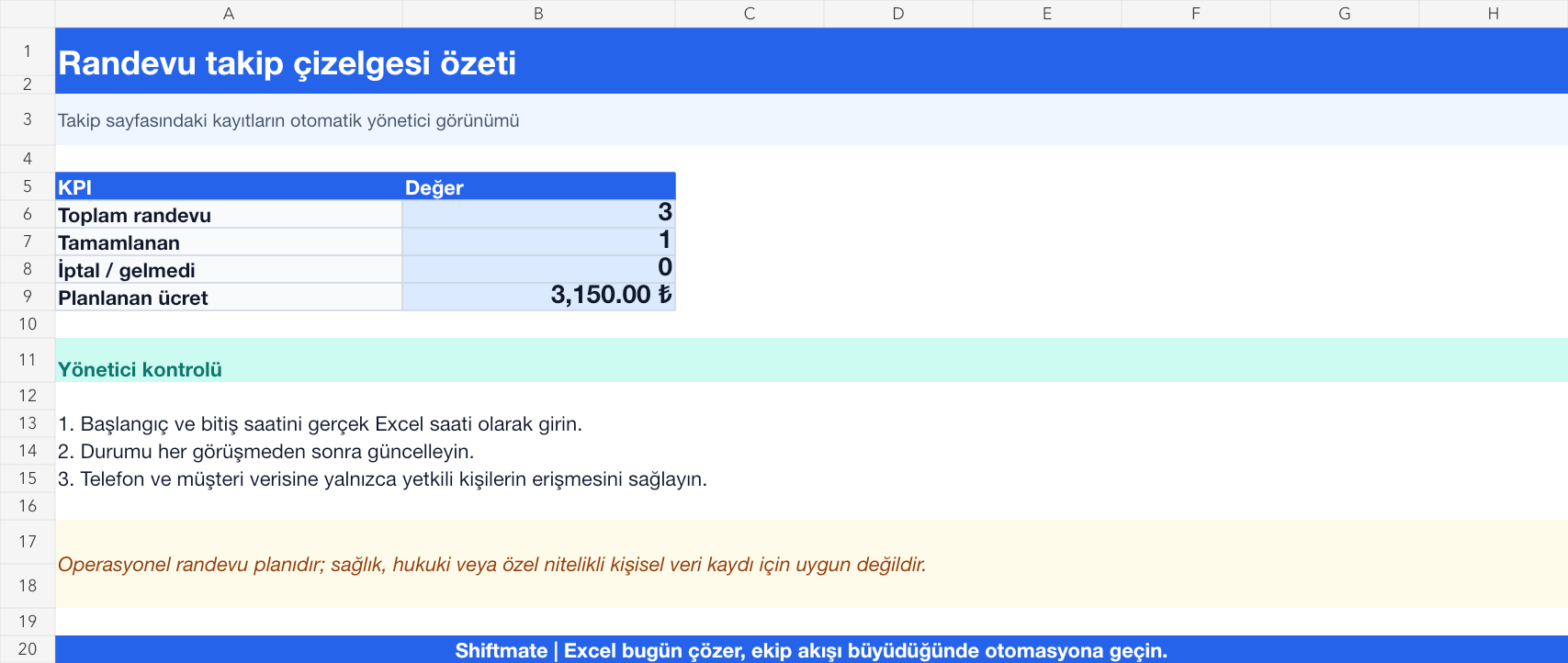
The images below are the actual data entry and executive summary pages of the workbook to be downloaded.
Step by step usage
Prepare the file according to your business
For each appointment, enter date, start, end, customer, service, responsible employee, contact information, status, fee, and payment status. Schedule employees' availability hours with the same calendar rule.
Run formulas and checks
Appointment time is calculated from the difference between the start and end. Summary; The total shows the planned fee with completed and canceled registrations. Check date and time order before publishing conflicting hours for the same employee.
Turn results into action
Review the indicators on the summary page. Call ahead for unconfirmed appointments. Add preparation and cleaning buffer to serving time. Periodically review the reasons for cancellation and no-show.
What does this Excel file solve?
Organize date, time, customer, service, responsible employee, appointment status and payment information in the weekly table. For each appointment, enter date, start, end, customer, service, responsible employee, contact information, status, fee, and payment status. Schedule employees' availability hours with the same calendar rule.
What's inside the file?
Date and time plan, Customer and service information, Appointment status, Fee and payment tracking. The file contains sample rows, canned formulas, data validation fields, risk colorings, and executive summary.
Calculation and control logic
Appointment time is calculated from the difference between the start and end. Summary; The total shows the planned fee with completed and canceled registrations. Check date and time order before publishing conflicting hours for the same employee.
Worked example: A daily service plan
3 appointments. 1 completed. Planned fee: 3.150 TL. Result: The afternoon appointment remains scheduled; The responsible employee sends the confirmation message and updates the payment status after the service is completed.
Decisions that can be taken as a result of this
Call ahead for unconfirmed appointments. Add preparation and cleaning buffer to serving time. Review the reasons for cancellation and no-show periodically.
Common usage mistakes
Leaving the end time blank and seeing the capacity as higher than it is. Using the same status as planned and approved. Storing customer contact information in a public file
Limits and proper use
File is not an online reservation system; it doesn't send automatic reminders to the customer, doesn't prevent conflict, and doesn't share team changes in real time. Limit sharing permissions and personal data access.
Compatibility and quality control
All 67 workbooks underwent formula error scanning, recalculation checking, and page-by-page visual inspection. Standard .xlsx file; Does not contain macros or external links. Formulas and data validation fields run inside the file. It is recommended that you keep the original file and work on a separate copy for your business.
Transitioning from Excel to automation
Use the file to solve your small business operation need immediately. When registration and approval traffic grows, move the same process to the Shiftmate workspace.
Relevant official and technical resources
Frequently asked questions
How to add recurring appointments?
Copy each date onto a separate line and change only the actual datetime value. Instead of deleting a single canceled session, keep it with its status; thus the capacity analysis is not distorted.
Can multiple employees be scheduled at the same time?
Yes. Name the responsible employee for each appointment. Sort and check records by date, employee, and start time to avoid overlapping the same employee.