Shiftmate
Shift based personnel cost Excel template
Calculate total personnel cost by shift, employee and day from net working hours and hourly cost.
Prepared by:Shiftmate Product and Operations Team · Son kontrol:
Actual file previews
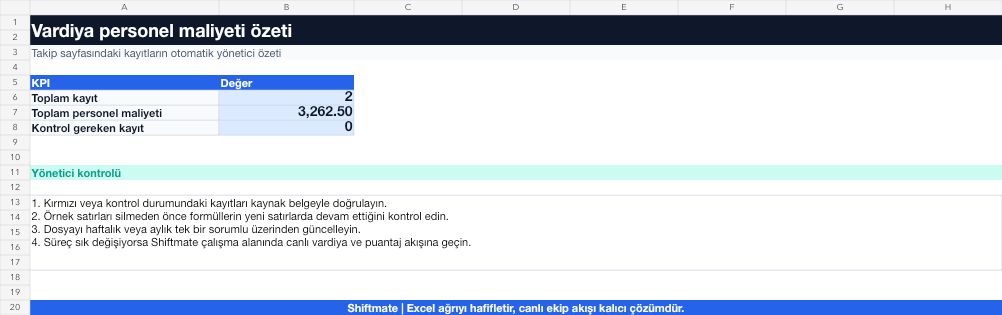
The images below are the actual data entry and executive summary pages of the workbook to be downloaded.

Step by step usage
Prepare the file according to your business
Enter shift date, employee, start-end, unpaid break, total employer cost per hour and net turnover for the same period.
Run formulas and checks
Net paid hours are calculated by subtracting the unpaid break from the shift duration. Shift cost is net hours multiplied by hourly cost; Turnover ratio is total personnel cost divided by net turnover.
Turn results into action
Review the indicators on the summary page. Compare cost by day and shift. Find out if there is excess coverage when turnover is low. Update the hourly cost assumption regularly.
What does this Excel file solve?
Calculate total personnel cost by shift, employee and day from net working hours and hourly cost. Enter shift date, employee, start-end, unpaid break, total employer cost per hour and net turnover for the same period.
What's inside the file?
Net hour calculation, Hourly cost, Shift total cost, Turnover rate control. The file contains sample rows, canned formulas, data validation fields, risk colorings, and executive summary.
Calculation and control logic
Net paid hours are calculated by subtracting the unpaid break from the shift duration. Shift cost is net hours multiplied by hourly cost; Turnover ratio is total personnel cost divided by net turnover.
Worked example: Peak day cost control
Net turnover: 48,000 TL. Total paid time: 86 hours. Average hourly cost: 210 TL. Result: Personnel cost is 18,060 TL and turnover rate is 37.6%; the manager reviews extra coverage blocks during low turnover hours.
Decisions that can be taken as a result of this
Compare cost by day and shift. Find out if there is excess coverage when turnover is low. Update the hour cost assumption regularly
Common usage mistakes
Entering the wrong amount in a field that requires total employer cost instead of net wage. Dropping the break twice. Mixing turnover with and without VAT between periods
Limits and proper use
Ratio alone does not indicate optimum staffing; service quality should be interpreted together with sales potential and employee skills.
Compatibility and quality control
All 67 workbooks underwent formula error scanning, recalculation checking, and page-by-page visual inspection. Standard .xlsx file; Does not contain macros or external links. Formulas and data validation fields run inside the file. It is recommended that you keep the original file and work on a separate copy for your business.
Transitioning from Excel to automation
Use the file to quickly solve shift and workforce planning needs. When registration and approval traffic grows, move the same process to the Shiftmate workspace.
Relevant official and technical resources
Frequently asked questions
What items should be included in the hourly cost?
Based on your analysis, include gross compensation, employer fringe cost, and regular benefits in the same way; Do not change the definition between periods.
What is the ideal personnel cost ratio?
There is no single universal ratio. Monitor your own goals and trends according to business type, service model and seasonal turnover.