Shiftmate
Shift book and turnover log Excel
Record incident, open task, stock or equipment note that occurred during the shift with priority, responsible and next shift confirmation.
Prepared by:Shiftmate Product and Operations Team · Son kontrol:
Actual file previews
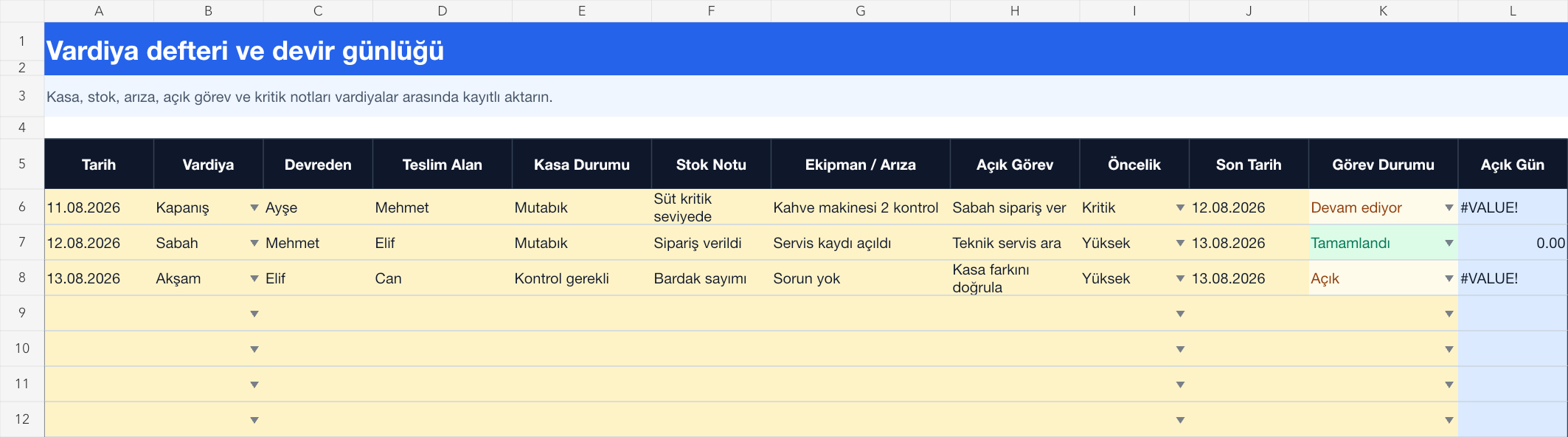
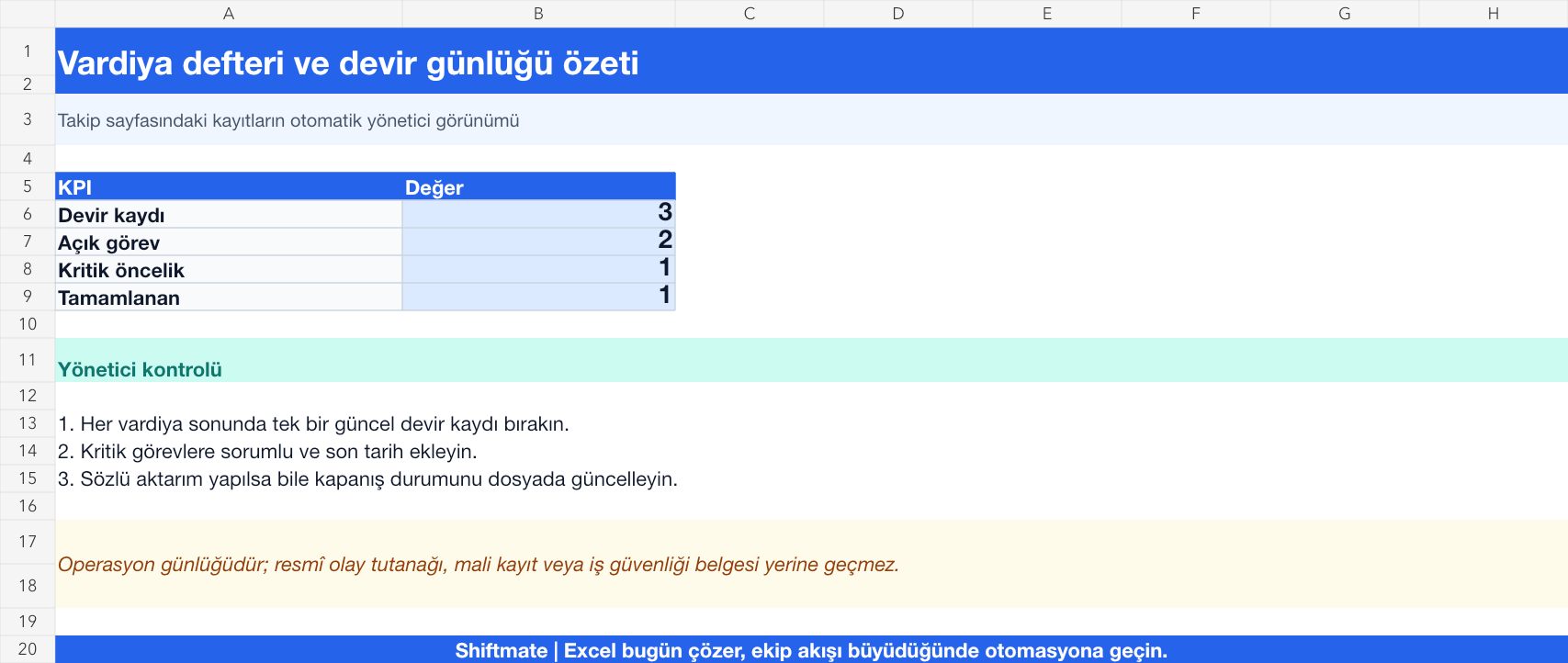
The images below are the actual data entry and executive summary pages of the workbook to be downloaded.
Step by step usage
Prepare the file according to your business
Write the date, shift, deliverer and receiver, category, incident or task description, priority, responsible, target date, and status on each handover record. Convert the important issue conveyed orally into a recording before the shift closes.
Run formulas and checks
The number of open days makes the difference between the target date and the control date visible. The summary page counts open tasks and critical priorities. When a registration is completed, include the result and confirmation of the inheriting shift; Don't lose history by deleting old comment.
Turn results into action
Review the indicators on the summary page. Confirm critical open work at the beginning of the shift. Give each task a single responsible and realistic target date. Move recurring events to the maintenance or process improvement list.
What does this Excel file solve?
Record incident, open task, stock or equipment note that occurred during the shift with priority, responsible and next shift confirmation. Write date, shift, deliverer and receiver, category, incident or task description, priority, responsible, target date, and status on each handoff record. Convert the important issue conveyed orally into a recording before the shift closes.
What's inside the file?
Shift handover log, Incident and open task record, Priority and responsible, Handover confirmation and open day. The file contains sample rows, canned formulas, data validation fields, risk colorings, and executive summary.
Calculation and control logic
The number of open days makes the difference between the target date and the control date visible. The summary page counts open tasks and critical priorities. When a registration is completed, include the result and confirmation of the inheriting shift; Don't lose history by deleting old comment.
Worked example: Branch transfer from evening to morning
3 cycle recording. 2 open missions. 1 critical equipment issue. Result: The critical malfunction is carried to the first check of the morning shift, the responsible person is clarified and confirmed with a closing note when completed.
Decisions that can be taken as a result of this
Confirm critical open work at the beginning of the shift. Give each task a single responsible and realistic target date. Move recurring events to the maintenance or process improvement list
Common usage mistakes
Combining multiple tasks into long free text. Considering the transfer completed without receiving confirmation. Deleting the resolved record and losing the event history
Limits and proper use
The file does not replace an emergency, occupational safety notification or official incident report. Implement the business' defined notification and escalation process for critical safety, quality or customer incidents.
Compatibility and quality control
All 67 workbooks underwent formula error scanning, recalculation checking, and page-by-page visual inspection. Standard .xlsx file; Does not contain macros or external links. Formulas and data validation fields run inside the file. It is recommended that you keep the original file and work on a separate copy for your business.
Transitioning from Excel to automation
Use the file to quickly solve shift and workforce planning needs. When registration and approval traffic grows, move the same process to the Shiftmate workspace.
Relevant official and technical resources
Frequently asked questions
What topics should be written in the shift book?
Record open tasks, equipment, stock, customers, cleaning and operations issues that the next shift needs to know or take action on in a concise, verifiable and responsible manner.
Should completed records be deleted?
No. Make the status completed, add closing note and date. Historical records are necessary to evaluate recurring problems and quality of turnover.