Shiftmate
Restaurant income expense table Excel
Track raw material, commission, energy, personnel and other restaurant expenses together with lounge, takeaway and platform revenues.
Prepared by:Shiftmate Product and Operations Team · Son kontrol:
Actual file previews
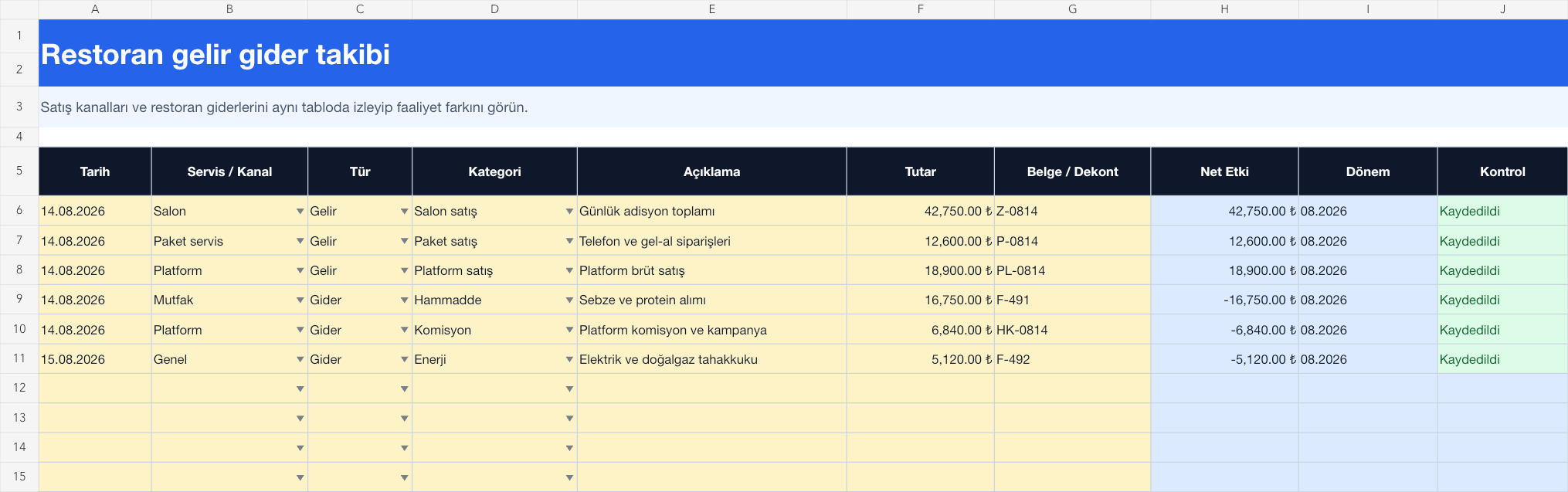
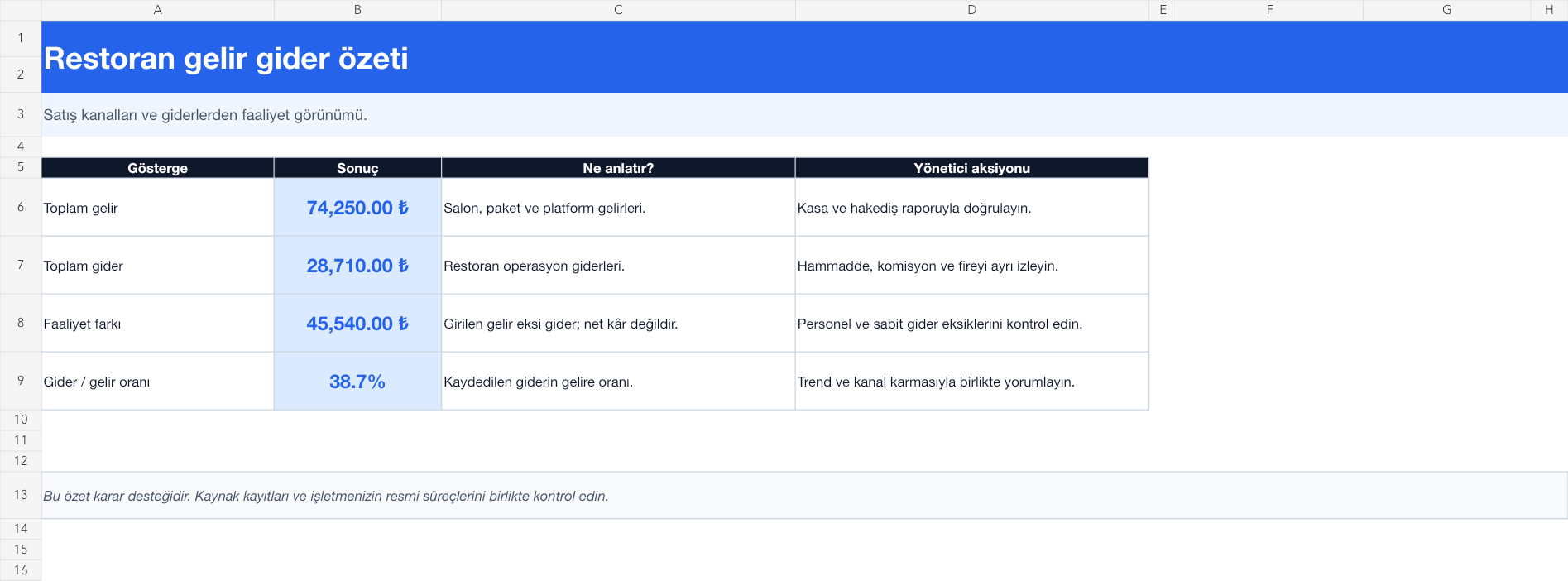
The images below are the actual data entry and executive summary pages of the workbook to be downloaded.
Step by step usage
Prepare the file according to your business
Salon, takeaway and platform revenues; Record raw materials, personnel, rent, energy, commission, wastage and other expenses on separate lines. Fill in the date, service-channel, type, category, description, amount and document reference. Tracking platform sales as gross revenue, commission, and campaign deduction as separate expenses makes channel economics more visible.
Run formulas and checks
Income lines create a positive net effect and expense lines create a negative net effect. The summary calculates total revenue, total expenses, activity variance, and expense/income ratio. This rate only covers the transactions entered into the file. The result should not be interpreted as net profit without checking it with daily cash reconciliation, platform progress payment, supplier invoice and accounting records.
Turn results into action
Review the indicators on the summary page. Review channel revenue along with relevant commission. Separate raw material and wastage trend. Complete missing fixed and personnel expenses.
What does this Excel file solve?
Track raw material, commission, energy, personnel and other restaurant expenses together with lounge, takeaway and platform revenues. Salon, takeaway and platform revenues; Record raw materials, personnel, rent, energy, commission, wastage and other expenses on separate lines. Fill in the date, service-channel, type, category, description, amount and document reference. Tracking platform sales as gross revenue, commission, and campaign deduction as separate expenses makes channel economics more visible.
What's inside the file?
Channel-based restaurant revenue, Operational expense categories, Automatic activity variance, Expense/income ratio. The file contains sample rows, canned formulas, data validation fields, risk colorings, and executive summary.
Calculation and control logic
Income lines create a positive net effect and expense lines create a negative net effect. The summary calculates total revenue, total expenses, activity variance, and expense/income ratio. This rate only covers the transactions entered into the file. The result should not be interpreted as net profit without checking it with daily cash reconciliation, platform progress payment, supplier invoice and accounting records.
Worked example: Seeing the hall and platform mix on the same day
Total income: 74,250 TL. Recorded expense: 28,710 TL. Platform income and commission are separate. Result: Activity difference appears as 45,540 TL, expense/income ratio as 38.7 percent. The manager makes up for missing personnel and fixed expenses; It evaluates the price and campaign decision by examining the platform channel's gross sales and deduction separately.
Decisions that can be taken as a result of this
Review channel revenue along with relevant commission. Separate raw material and wastage trend. Complete missing fixed and personnel expenses
Common usage mistakes
Writing off platform progress as income twice, both gross sales and net collections. Adding the daily cash difference to the income or expense category without explanation. Mistaking the operating difference as net profit after tax
Limits and proper use
The file is the restaurant manager's operational view; It is not an official income statement, accounting book or tax record. Use your financial advisor's data as basis for accrual, VAT, depreciation and end-of-period records.
Compatibility and quality control
All 67 workbooks underwent formula error scanning, recalculation checking, and page-by-page visual inspection. Standard .xlsx file; Does not contain macros or external links. Formulas and data validation fields run inside the file. It is recommended that you keep the original file and work on a separate copy for your business.
Transitioning from Excel to automation
Use the file to solve restaurant operation needs immediately. When registration and approval traffic grows, move the same process to the Shiftmate workspace.
Relevant official and technical resources
Frequently asked questions
What is its difference from the general income and expense file?
This version brings ready industry categories such as raw materials, commission, wastage and energy through the restaurant's lounge, takeaway and platform channels; Decision examples are arranged according to restaurant operation.
How should the platform commission be recorded?
Keeping gross sales and commission on separate lines makes it easier to see the true impact of the channel. Verify the base and deductions in the progress payment report with the source document.
Is the expense/income ratio food cost?
No. The expense/income ratio compares all expenses in the file to income. Food cost is simply the ratio of the recipe or raw material cost to sales.