Shiftmate
Cafe and restaurant opening-closing checklist Excel
Verify cash register, hall, kitchen, stock, cleaning and security duties on opening and closing shifts.
Prepared by:Shiftmate Product and Operations Team · Son kontrol:
Actual file previews
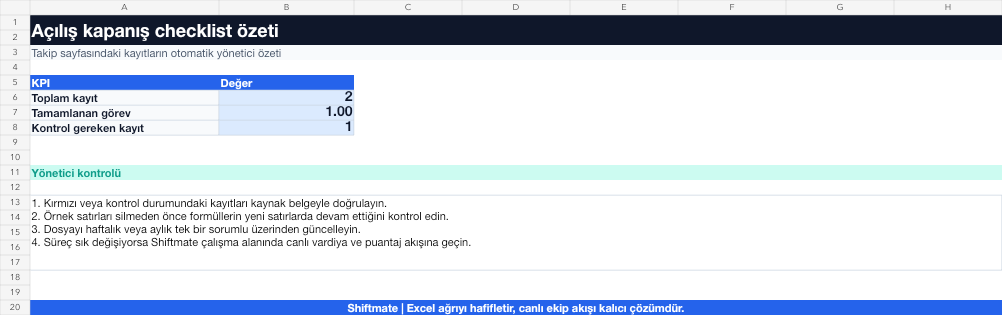
The images below are the actual data entry and executive summary pages of the workbook to be downloaded.

Step by step usage
Prepare the file according to your business
Classify lounge, cash register, kitchen, stock, cleaning and security duties as opening or closing; Assign roles, shifts, and verifiers to each task.
Run formulas and checks
An incomplete task is a record that does not have a completed and verified mark in the relevant shift. Track critical tasks separately from overall completion rate.
Turn results into action
Review the indicators on the summary page. Mark the critical task. Link the task to the role. Separate the verifier from the task owner.
What does this Excel file solve?
Verify cash register, hall, kitchen, stock, cleaning and security duties on opening and closing shifts. Classify lounge, cash register, kitchen, stock, cleaning and security duties as opening or closing; Assign roles, shifts, and verifiers to each task.
What's inside the file?
Opening tasks, Closing tasks, Responsible and verifier, Missing task alert. The file contains sample rows, canned formulas, data validation fields, risk colorings, and executive summary.
Calculation and control logic
An incomplete task is a record that does not have a completed and verified mark in the relevant shift. Track critical tasks separately from overall completion rate.
Worked example: Closing shift control
28 closing tasks. 26 completed. Missing: cold cabinet registration and back door control. Result: While the overall rate is high, two critical missions remain in the red; The shift manager verifies the situation without leaving the workplace.
Decisions that can be taken as a result of this
Mark the critical task. Link the task to the role. Separate the validator from the task owner
Common usage mistakes
Blindly applying the same checklist to every branch. Marking the task as completed and not verifying the evidence. Show opening and closing tasks simultaneously
Limits and proper use
The checklist complements local food safety, occupational safety and company procedures; It does not replace them.
Compatibility and quality control
All 67 workbooks underwent formula error scanning, recalculation checking, and page-by-page visual inspection. Standard .xlsx file; Does not contain macros or external links. Formulas and data validation fields run inside the file. It is recommended that you keep the original file and work on a separate copy for your business.
Transitioning from Excel to automation
Use the file to solve restaurant operation needs immediately. When registration and approval traffic grows, move the same process to the Shiftmate workspace.
Relevant official and technical resources
Frequently asked questions
Should the checklist be reopened every day?
Yes. New recording on a day and shift basis enables accurate analysis of past deficiencies and recurring problems.
Can the task owner and the verifier be the same person?
It can happen in small teams; For critical chassis, security or temperature tasks, a second check provides stronger evidence.