Shiftmate
Fixed inventory tracking Excel template
Track business assets by asset code, serial number, location, responsible, purchase cost, warranty and usage status.
Prepared by:Shiftmate Product and Operations Team · Son kontrol:
Actual file previews
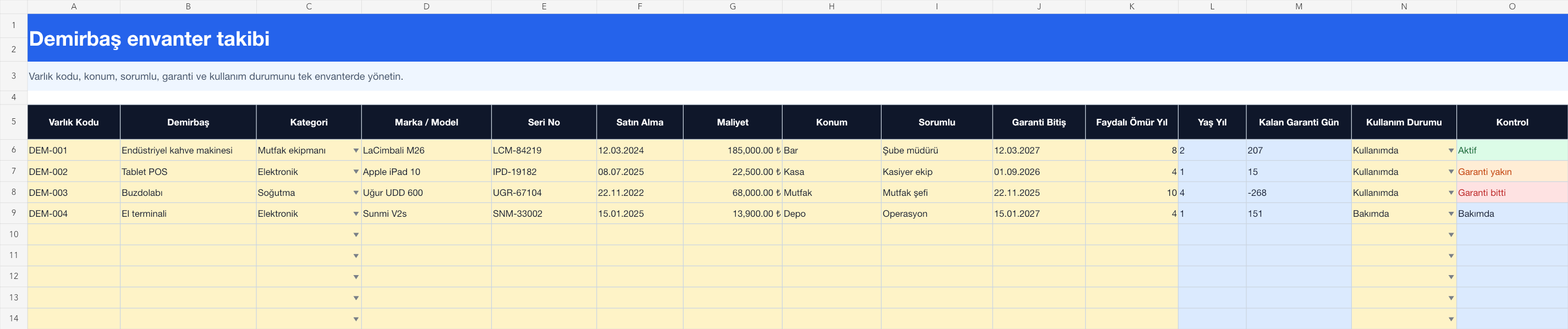
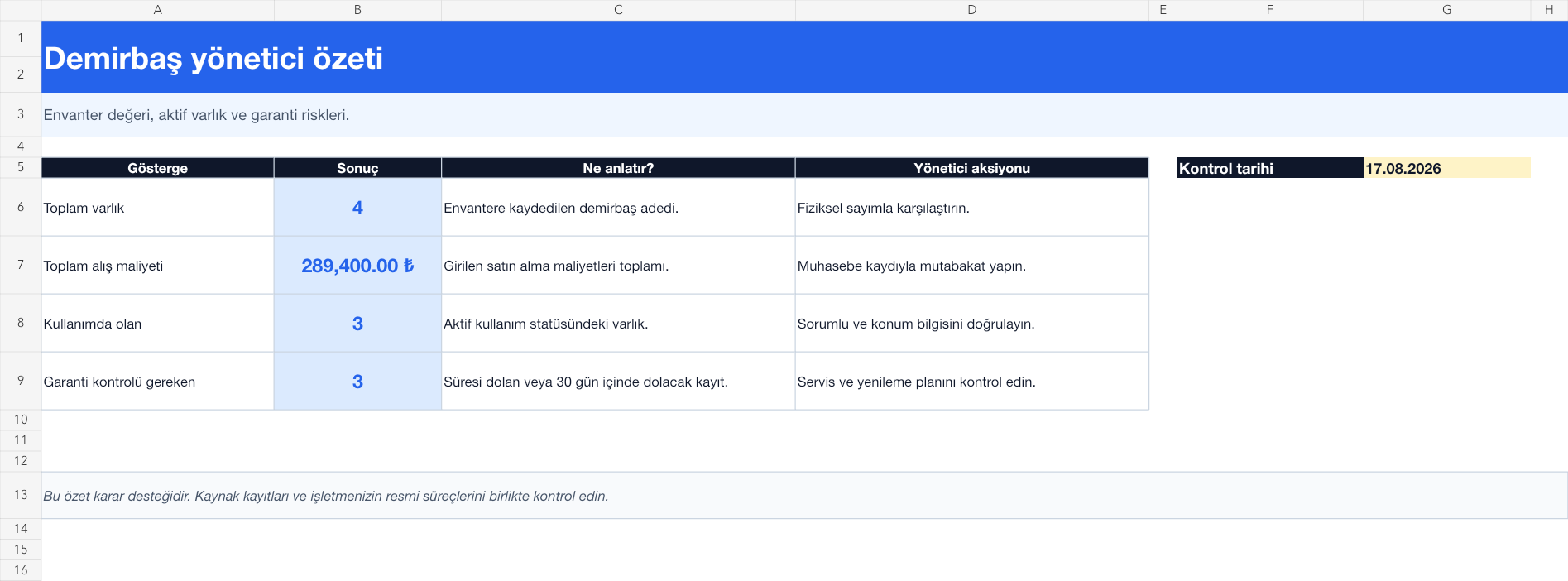
The images below are the actual data entry and executive summary pages of the workbook to be downloaded.
Step by step usage
Prepare the file according to your business
Give each asset a unique asset code that matches its physical tag. Enter the asset name, category, brand-model, serial number, purchase date, cost, location, responsible, warranty expiration, useful life and usage status. Also use a debit register for assets handed over to the employee.
Run formulas and checks
Calculates the age of the asset in years based on the file control date and the days remaining until the warranty expires. Generates a control alert if the warranty of an asset in use has expired or will expire within 30 days; It shows the exact status of the records that are under maintenance or in storage. The summary totals the total assets, purchase cost, those in use, and those requiring a warranty check.
Turn results into action
Review the indicators on the summary page. Schedule service for the asset approaching warranty. Verify location and principal by physical count. Separate maintenance and passive asset from active inventory.
What does this Excel file solve?
Track business assets by asset code, serial number, location, responsible, purchase cost, warranty and usage status. Give each asset a unique asset code that matches its physical tag. Enter the asset name, category, brand-model, serial number, purchase date, cost, location, responsible, warranty expiration, useful life and usage status. Also use a debit register for assets handed over to the employee.
What's inside the file?
Unique asset code, Location and responsible, Warranty remaining days calculation, Active and maintenance status summary. The file contains sample rows, canned formulas, data validation fields, risk colorings, and executive summary.
Calculation and control logic
Calculates the age of the asset in years based on the file control date and the days remaining until the warranty expires. Generates a control alert if the warranty of an asset in use has expired or will expire within 30 days; It shows the exact status of the records that are under maintenance or in storage. The summary totals the total assets, purchase cost, those in use, and those requiring a warranty check.
Worked example: Branch equipment counting and warranty control
4 fixtures. Total purchase cost: 289.400 TL. A warranty expires in 15 days. Result: The upcoming warranty warning appears before the service period expires. The administrator verifies the serial number and invoice reference, checks the physical location and opens the maintenance or renewal plan if necessary.
Decisions that can be taken as a result of this
Schedule service for the asset approaching warranty. Verify location and principal by physical count. Separate maintenance and passive asset from active inventory
Common usage mistakes
Giving the same asset code to two assets. Thinking that fixed assets inventory and employee embezzlement are the same thing. Interpreting the purchase cost as current market value or depreciation
Limits and proper use
The template is the operational asset inventory; It is not an accounting asset list, depreciation account, insurance value or signed debit document. Limit access to data such as serial number and employee responsibility.
Compatibility and quality control
All 67 workbooks underwent formula error scanning, recalculation checking, and page-by-page visual inspection. Standard .xlsx file; Does not contain macros or external links. Formulas and data validation fields run inside the file. It is recommended that you keep the original file and work on a separate copy for your business.
Transitioning from Excel to automation
Use the file to solve your small business operation need immediately. When registration and approval traffic grows, move the same process to the Shiftmate workspace.
Relevant official and technical resources
Frequently asked questions
What is the difference from the zimmet form?
The debit form tracks the delivery and return of a piece of equipment to the employee. Fixed asset inventory tracks code, location, cost, warranty, and usage status throughout the asset's life.
Does the useful life area calculate depreciation?
No. It is an information area only for management planning. Your financial advisor should verify the official depreciation method and duration.
What if there is no warranty information?
The control column gives a warning of no warranty information. If the date can be found from the invoice, service contract, or manufacturer's record, complete it.