Shiftmate
Tip distribution calculation Excel template
Distribute the total tip pool transparently to employees according to working hours and role coefficient.
Prepared by:Shiftmate Product and Operations Team · Son kontrol:
Actual file previews
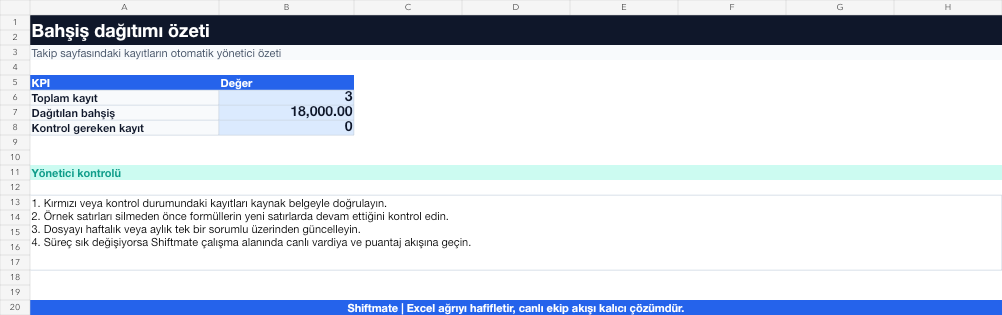
The images below are the actual data entry and executive summary pages of the workbook to be downloaded.

Step by step usage
Prepare the file according to your business
Enter the net tip pool to be distributed, employees' paid hours during the period, and your business's previously announced role coefficient.
Run formulas and checks
Employee score is the product of paid hours multiplied by the role coefficient. The person's share is calculated as the ratio of his/her own score to the total score multiplied by the tip pool.
Turn results into action
Review the indicators on the summary page. Explain the coefficients before the semester begins. Match the total distribution to the pool. Correct the missing hour record before payment.
What does this Excel file solve?
Distribute the total tip pool transparently to employees according to working hours and role coefficient. Enter the net tip pool to be distributed, employees' paid hours during the period, and your business's previously announced role coefficient.
What's inside the file?
Tip pool, Hour and role score, Automatic share calculation, Distribution control. The file contains sample rows, canned formulas, data validation fields, risk colorings, and executive summary.
Calculation and control logic
Employee score is the product of paid hours multiplied by the role coefficient. The person's share is calculated as the ratio of his/her own score to the total score multiplied by the tip pool.
Worked example: Weekly pool distribution
Pool: 18,000 TL. Total score: 620. Employee score: 52. Result: Employee share is 18,000 × 52 / 620 = 1,509.68 TL; controlled by the total pool distributed.
Decisions that can be taken as a result of this
Explain the coefficients before the semester begins. Match the total distribution to the pool. Correct missing hour record before payment
Common usage mistakes
Changing the role coefficient after payment. Taking leave or break time inconsistently. Randomly assigning the rounding difference to an employee
Limits and proper use
The template provides mathematical distribution; Tip policy, tax and employee rights should be based on your business's written rule and expert opinion.
Compatibility and quality control
All 67 workbooks underwent formula error scanning, recalculation checking, and page-by-page visual inspection. Standard .xlsx file; Does not contain macros or external links. Formulas and data validation fields run inside the file. It is recommended that you keep the original file and work on a separate copy for your business.
Transitioning from Excel to automation
Use the file to solve restaurant operation needs immediately. When registration and approval traffic grows, move the same process to the Shiftmate workspace.
Relevant official and technical resources
Frequently asked questions
Can tips be distributed only by the hour?
Yes; If you set all role coefficients to 1, the distribution is based on paid hour weight only.
How to manage rounding difference?
Keep the small difference between the total distribution and the pool visible in a separate rounding line and anchor your policy.