Shiftmate
Vehicle fuel and mileage tracking Excel template
Record the kilometers traveled, fuel used and amount paid during full tank intervals. Calculate L/100 km and TL/km.
Prepared by:Shiftmate Product and Operations Team · Son kontrol:
Actual file previews
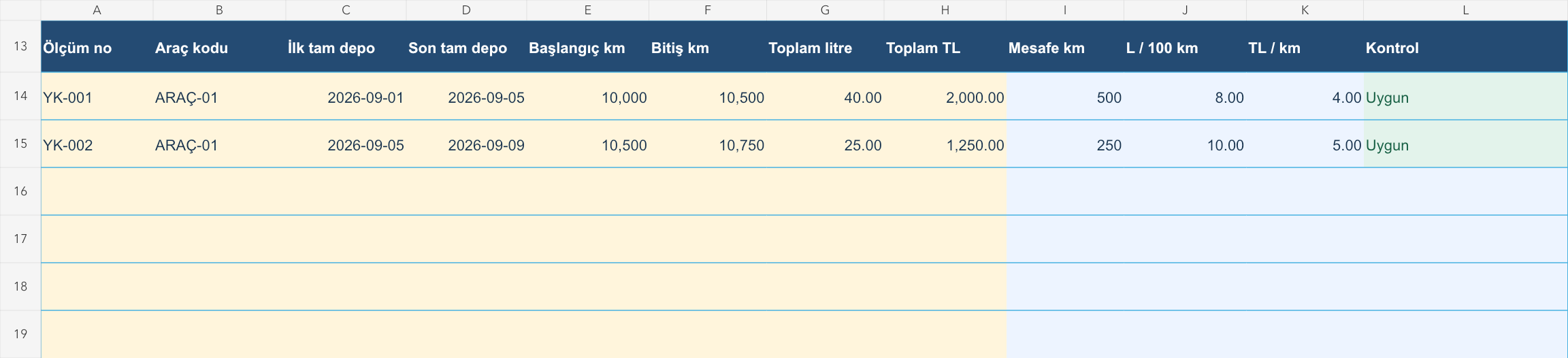
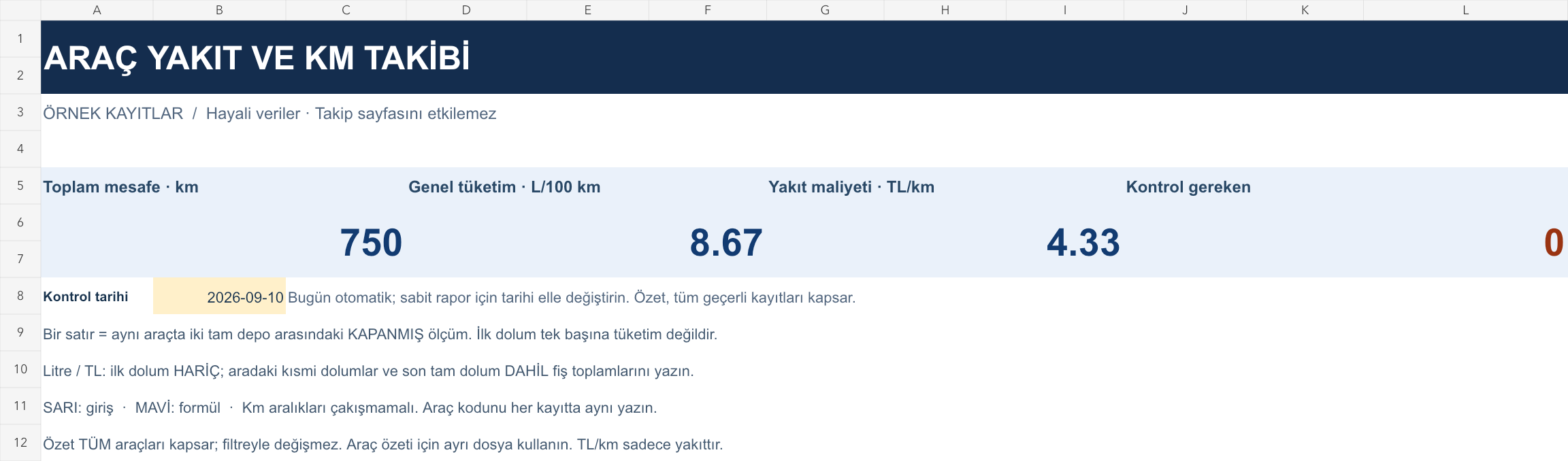
The images below are the actual data entry and executive summary pages of the workbook to be downloaded.
Step by step usage
Examine the example and prepare the blank file
Each line is the measurement interval between two consecutive full tank fills of the same vehicle. Note the date and mileage on the first full tank. Enter the due date and mileage on the next full tank. In the Liters field, write the total fuel consumed, excluding the first fill, including the partial fills in between and the last full fill. Enter the total of the same receipts in the Amount field. Use similar fill level for two fills. The first filling alone does not create a consumption record. You can use a fixed in-house code instead of a license plate in the vehicle field.
Write actual records in the yellow fields
Distance is the finishing kilometer minus the starting kilometer. L/100 km calculation liter / distance × 100; TL/km is the calculated amount/distance. The overall consumption rate is not the simple average of line rates, but the calculation of total liters / total kilometers × 100 in valid lines. Conflicting mileage ranges on the same vehicle produce duplicate registration number, zero or decreasing mileage and missing positive liter check warning; These lines are not included in the total. It is possible that the amount is 0, but the empty amount is considered not yet entered. All tools are included in the overview; The filter does not change the summary.
Fix control alerts and review summary
Compare intervals for the same vehicle on similar routes and load conditions. In case of unexpected consumption, first investigate the missing receipt and mileage error. Use cost weighted by total distance in the fuel budget.
What does this Excel file solve?
Record the kilometers traveled, fuel used and amount paid during full tank intervals. Calculate L/100 km and TL/km. Each line is the measurement interval between two consecutive full tank fills of the same vehicle. Note the date and mileage on the first full tank. Enter the due date and mileage on the next full tank. In the Liters field, write the total fuel consumed, excluding the first fill, including the partial fills in between and the last full fill. Enter the total of the same receipts in the Amount field. Use similar fill level for two fills. The first filling alone does not create a consumption record. You can use a fixed in-house code instead of a license plate in the vehicle field.
What's inside the file?
Full tank intervals on a vehicle basis, Kilometer, liter and amount entry, L/100 km and TL/km calculation, General summary weighted by distance. The file contains sample rows, canned formulas, data validation fields, risk colorings, and executive summary.
Calculation and control logic
Distance is the finishing kilometer minus the starting kilometer. L/100 km calculation liter / distance × 100; TL/km is the calculated amount/distance. The overall consumption rate is not the simple average of line rates, but the calculation of total liters / total kilometers × 100 in valid lines. Conflicting mileage ranges on the same vehicle produce duplicate registration number, zero or decreasing mileage and missing positive liter check warning; These lines are not included in the total. It is possible that the amount is 0, but the empty amount is considered not yet entered. All tools are included in the overview; The filter does not change the summary.
Worked example: Accurate overall consumption at different distances
December 1: 500 km, 40 liters, 2,000 TL. December 2: 250 km, 25 liters, 1.250 TL. Result: For a total of 750 km, 65 liters and 3,250 TL, consumption is 8.67 L/100 km and fuel cost is 4.33 TL/km. The average of line ratios of 9 L/100 km is not accurate for this total.
Decisions that can be taken as a result of this
Compare intervals for the same vehicle on similar routes and load conditions. In case of unexpected consumption, first investigate the missing receipt and mileage error. Use weighted cost by total distance in fuel budget
Common usage mistakes
Inflating the consumption by including the fuel of the first fill in the measurement range. Forgetting partial fills in between or mistaking each receipt for an independent full tank range. Combining L/100 km values of different distances with the arithmetic mean
Limits and proper use
The calculation is based on the assumption of similar fill levels and complete receipts; measurement is approximate consumption. It does not include electric vehicle energy, maintenance, insurance and depreciation. TL/km only represents the fuel amount entered; It is not the total cost of vehicle ownership. If a vehicle-based summary is required, use a separate file for each vehicle. 150 measuring ranges are available; Do not include unclosed warehouse range in numerical calculations.
Compatibility and quality control
Two pages of this file were visually inspected; Formulas were recalculated and checked in empty, sample and incorrect entry scenarios. There was no separate device testing of the Excel desktop application. .xlsx without macro; formulas and drop-down lists are included in the file. The tracking page includes 150 preset record lines and a standalone Sample page. Prepared for desktop Excel; Check views and validations in other spreadsheet applications.
Scope of this file
This file is for recording measurement intervals manually. Shiftmate does not offer vehicle tracking, GPS, fuel cards or fleet management services; The Excel file works independently of these applications.
Relevant official and technical resources
Frequently asked questions
What should I do when I buy half a tank of fuel?
Keep the receipt and save the liter and amount until the next full tank fill. Enter all intermediate fillings and final filling together in the closed gap.
Does the ratio above change when I select a vehicle with the filter?
No. The summary includes all valid records. To evaluate tools independently, keep one file per tool; Use the filter to examine rows.
Does this file automatically read the mileage via GPS?
No. You manually enter odometer readings and fuel receipts. There is no GPS, fuel card and bank integration.