Shiftmate
Excel template for tracking missing documents in personnel personnel file
Track required documents, deficiencies and expiration dates in employee personnel files in a single list.
Prepared by:Shiftmate Product and Operations Team · Son kontrol:
Actual file previews
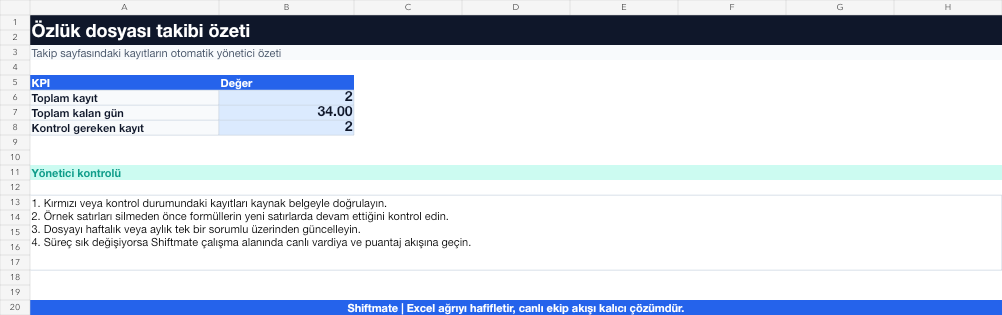
The images below are the actual data entry and executive summary pages of the workbook to be downloaded.

Step by step usage
Prepare the file according to your business
Record document presence/absence status, delivery date, validity date, responsible and follow-up note based on employee and document type. Do not embed the document itself in this tracking file.
Run formulas and checks
Completion rate is the ratio of the current number of required documents to the expected number of documents. Documents whose expiration date is approaching or are missing are shown in separate check status.
Turn results into action
Review the indicators on the summary page. Define documentation requirement by role. Review upcoming deadlines weekly. Limit access authority.
What does this Excel file solve?
Track required documents, deficiencies and expiration dates in employee personnel files in a single list. Record document presence/absence status, delivery date, validity date, responsible and follow-up note based on employee and document type. Do not embed the document itself in this tracking file.
What's inside the file?
Document control matrix, Missing documents warning, Expiration date, Employee completion rate. The file contains sample rows, canned formulas, data validation fields, risk colorings, and executive summary.
Calculation and control logic
Completion rate is the ratio of the current number of required documents to the expected number of documents. Documents whose expiration date is approaching or are missing are shown in separate check status.
Worked example: Scanning missing documents
18 employees. 12 control items per person. A total of 9 missing records. Result: It is seen that 6 of the missing documents are expired documents; A follow-up list is created by assigning a responsible person and a deadline.
Decisions that can be taken as a result of this
Define documentation requirement by role. Review upcoming deadlines weekly. Limit access authority
Common usage mistakes
Applying the same list of unnecessary documents to all employees. Copying sensitive document content to the tracking table. Leaving the employee's retention policy unclear
Limits and proper use
This template is a document inventory, not a legal personnel file list. Determine the mandatory documents with your labor law and KVKK expert.
Compatibility and quality control
All 67 workbooks underwent formula error scanning, recalculation checking, and page-by-page visual inspection. Standard .xlsx file; Does not contain macros or external links. Formulas and data validation fields run inside the file. It is recommended that you keep the original file and work on a separate copy for your business.
Transitioning from Excel to automation
Use the file to solve human resources operations needs immediately. When registration and approval traffic grows, move the same process to the Shiftmate workspace.
Relevant official and technical resources
Frequently asked questions
Should I insert the ID or health document into Excel?
No. Keep only necessary status and date information in the tracking table; Store the document itself in a controlled and secure environment.
Are the same documents required for every employee?
No. Documentation requirements may vary depending on role, working style and special circumstances; Adapt your matrix with expert control.