Shiftmate
Personnel incident, minutes and action tracking Excel template
Record operational events, severity, action taken, person responsible, and closing date.
Prepared by:Shiftmate Product and Operations Team · Son kontrol:
Actual file previews
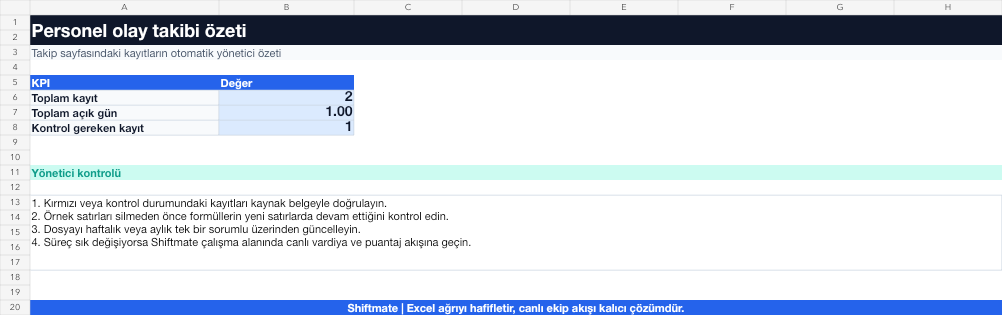
The images below are the actual data entry and executive summary pages of the workbook to be downloaded.

Step by step usage
Prepare the file according to your business
Record the incident number, date, location, contact persons, verifiable incident summary, severity level, action, responsible, and closing date.
Run formulas and checks
Open days is the difference between the posting date and the closing date or today's date. Sorting by importance and open time together highlights critical records that are overdue.
Turn results into action
Review the indicators on the summary page. Separate interpretation from fact. Assign sole responsibility for the action. Record closing evidence and date.
What does this Excel file solve?
Record operational events, severity, action taken, person responsible, and closing date. Record the incident number, date, location, contact persons, verifiable incident summary, severity level, action, responsible, and closing date.
What's inside the file?
Incident record number, Severity, Action and responsible, Open day account. The file contains sample rows, canned formulas, data validation fields, risk colorings, and executive summary.
Calculation and control logic
Open days is the difference between the posting date and the closing date or today's date. Sorting by importance and open time together highlights critical records that are overdue.
Worked example: Operation event tracking
11 records within the month. 3 high importance. A record has been open for 9 days. Result: High importance and longest open time are combined in the same record; the administrator handles this action before the general list.
Decisions that can be taken as a result of this
Separate interpretation from fact. Assign sole responsibility for the action. Record closing evidence and date
Common usage mistakes
Using accusatory or ambiguous language. Adding unnecessary personal information to the description. Not closing the recording when the action is completed
Limits and proper use
The template is the event inventory; It is not a substitute for a formal report, investigation or disciplinary procedure.
Compatibility and quality control
All 67 workbooks underwent formula error scanning, recalculation checking, and page-by-page visual inspection. Standard .xlsx file; Does not contain macros or external links. Formulas and data validation fields run inside the file. It is recommended that you keep the original file and work on a separate copy for your business.
Transitioning from Excel to automation
Use the file to solve human resources operations needs immediately. When registration and approval traffic grows, move the same process to the Shiftmate workspace.
Relevant official and technical resources
Frequently asked questions
Should every customer complaint have an incident record?
Determine based on your business's importance threshold. Standardize records that need to be monitored for duplication or employee safety.
How should an event description be written?
Write the date, location, observed behavior, and verifiable outcome; Avoid assumptions, insults, and unnecessary proprietary information.