Shiftmate
Personnel advance and deduction tracking Excel template
Track personnel advances, repayment plan, monthly deduction and remaining balance on an employee basis.
Prepared by:Shiftmate Product and Operations Team · Son kontrol:
Actual file previews
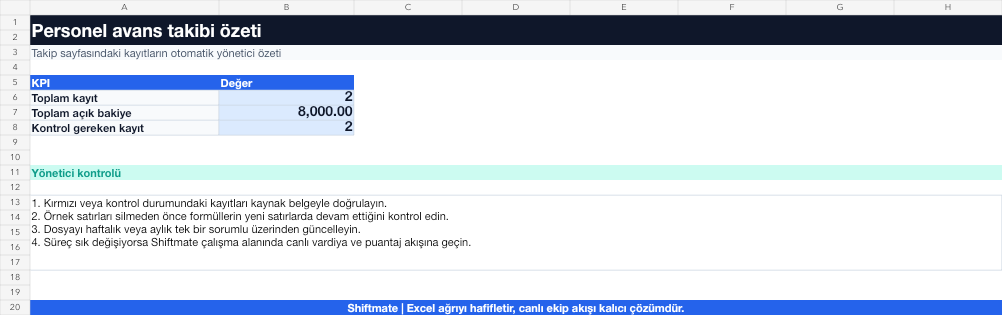
The images below are the actual data entry and executive summary pages of the workbook to be downloaded.

Step by step usage
Prepare the file according to your business
Enter the employee, advance date, starting amount, planned installment, actual deduction and description with unique registration number.
Run formulas and checks
The remaining balance is calculated by deducting the deductions from the initial advance. Keeping planned and actual deductions in separate areas makes payroll reconciliation easier.
Turn results into action
Review the indicators on the summary page. Check open balances at the end of the period. Reconcile the payroll record. Document the changed payment schedule with an explanation.
What does this Excel file solve?
Track personnel advances, repayment plan, monthly deduction and remaining balance on an employee basis. Enter the employee, advance date, starting amount, planned installment, actual deduction and description with unique registration number.
What's inside the file?
Advance record list, Installment and deduction plan, Remaining balance, Status alert. The file contains sample rows, canned formulas, data validation fields, risk colorings, and executive summary.
Calculation and control logic
The remaining balance is calculated by deducting the deductions from the initial advance. Keeping planned and actual deductions in separate areas makes payroll reconciliation easier.
Worked example: Three-month advance plan
Advance: 9,000 TL. Planned installment: 3,000 TL. Achieved in the second month: 2,000 TL. Result: At the end of the second month, the remaining balance appears as 4,000 TL; The last installment is updated with the new plan instead of being automatically assumed.
Decisions that can be taken as a result of this
Check open balances at the end of the period. Reconcile the payroll record. Document the changed payment schedule with an explanation
Common usage mistakes
Consider the planned outage as having occurred. Opening the same advance payment with two registration numbers. Sharing sensitive financial data with extended team
Limits and proper use
The file is not a debt or payroll agreement. Authorized expert control is required for deduction conditions, employee approval and payroll application.
Compatibility and quality control
All 67 workbooks underwent formula error scanning, recalculation checking, and page-by-page visual inspection. Standard .xlsx file; Does not contain macros or external links. Formulas and data validation fields run inside the file. It is recommended that you keep the original file and work on a separate copy for your business.
Transitioning from Excel to automation
Use the file to solve human resources operations needs immediately. When registration and approval traffic grows, move the same process to the Shiftmate workspace.
Relevant official and technical resources
Frequently asked questions
How to track if an employee receives multiple advances?
Open each advance with a separate registration number and link the deductions to the relevant registration number.
Does the file automatically update the payroll?
No. It is a checklist and balance tracking; It should be reconciled monthly with your payroll system.