Shiftmate
Part-time monthly hours and quota tracking Excel template
Compare the weekly and monthly hours of part-time employees with the contract quota and see the remaining hours automatically.
Prepared by:Shiftmate Product and Operations Team · Son kontrol:
Actual file previews
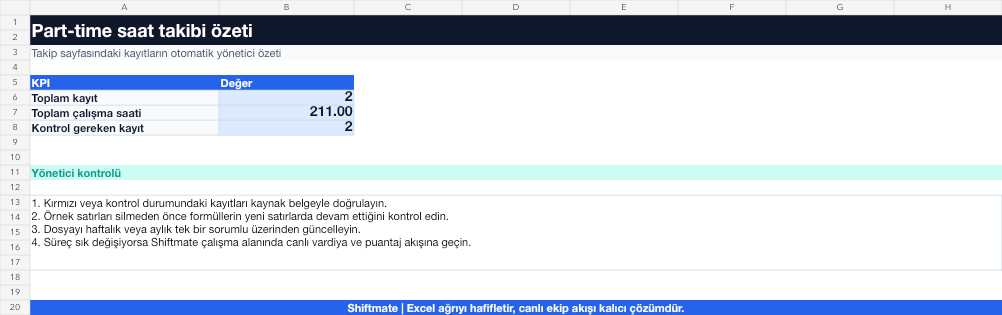
The images below are the actual data entry and executive summary pages of the workbook to be downloaded.

Step by step usage
Prepare the file according to your business
Enter the part-time employee, the monthly hour quota in the contract or business plan, and the actual paid hours each week. Calculate the break separately from working hours.
Run formulas and checks
Monthly actual hours are the sum of weekly entries. Remaining hours are calculated as quota minus actual hours; A negative value makes the quota exceedance visible.
Turn results into action
Review the indicators on the summary page. Balance shift in the last week. Tie the overage to administrator approval. Keep planned and actual separate.
What does this Excel file solve?
Compare the weekly and monthly hours of part-time employees with the contract quota and see the remaining hours automatically. Enter the part-time employee, the monthly hour quota in the contract or business plan, and the actual paid hours each week. Calculate the break separately from working hours.
What's inside the file?
5-week time entry, Monthly quota, Remaining hours calculation, Overage warning. The file contains sample rows, canned formulas, data validation fields, risk colorings, and executive summary.
Calculation and control logic
Monthly actual hours are the sum of weekly entries. Remaining hours are calculated as quota minus actual hours; A negative value makes the quota exceedance visible.
Worked example: Monthly quota control
Monthly quota: 96 hours. First four weeks: 82 hours. Last week plan: 20 hours. Result: If the plan is completed, it will be seen before the shift is published that the total will reach 102 hours and the quota will be exceeded by 6 hours.
Decisions that can be taken as a result of this
Balance shift in the last week. Tie the overage to administrator approval. Keep planned and actual separate
Common usage mistakes
Adding break time to paid hours. Assuming the month is four weeks. Writing the planned time as the actual time
Limits and proper use
The template is operational hour quota control; It does not replace payroll, SSI day or legal working time calculation.
Compatibility and quality control
All 67 workbooks underwent formula error scanning, recalculation checking, and page-by-page visual inspection. Standard .xlsx file; Does not contain macros or external links. Formulas and data validation fields run inside the file. It is recommended that you keep the original file and work on a separate copy for your business.
Transitioning from Excel to automation
Use the file to quickly solve shift and workforce planning needs. When registration and approval traffic grows, move the same process to the Shiftmate workspace.
Relevant official and technical resources
Frequently asked questions
Where to write the fifth week?
There are five weekly entry fields on the tracking page; Depending on the calendar structure of the month, the unused week may be left zero.
Does it calculate overtime pay?
No. Shows the time difference; Wage and payroll calculations should be made using the rules used by your financial advisor.