Shiftmate
Employment document list Excel
Keep track of new employees' employment document status, number of missing documents, responsible person and target start date in a controlled manner.
Prepared by:Shiftmate Product and Operations Team · Son kontrol:
Actual file previews
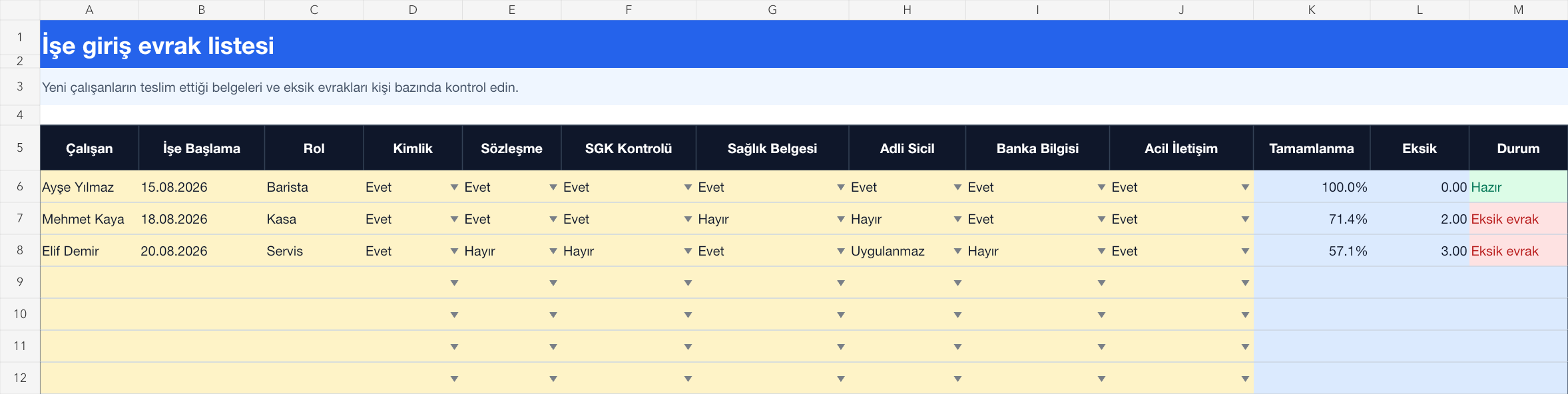
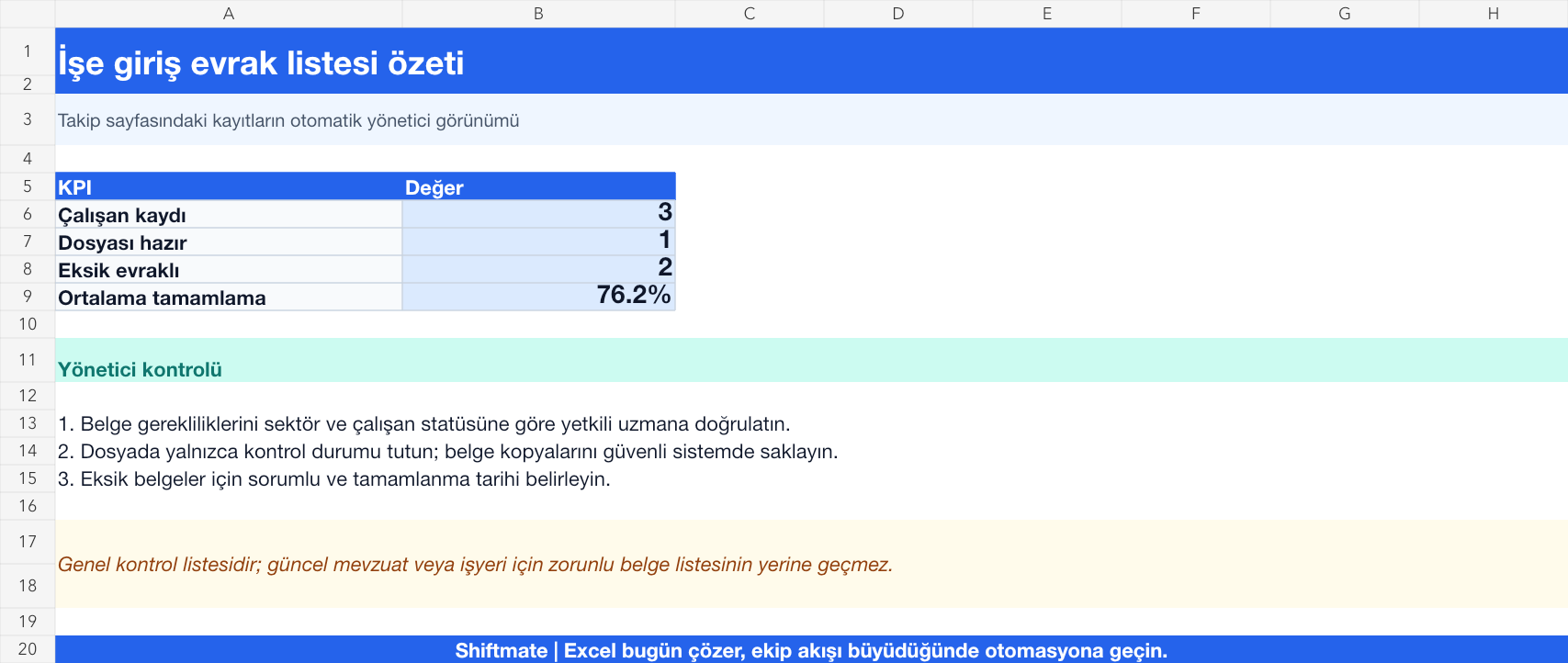
The images below are the actual data entry and executive summary pages of the workbook to be downloaded.
Step by step usage
Prepare the file according to your business
Enter the new employee's name, position, target start date, supervisor, and required documentation status that your business verifies. Adapt the sample document titles in the template according to your industry, position and current legislation control.
Run formulas and checks
Completion rate is calculated by dividing the number of documents marked as delivered by the total number of documents tracked. If the number of missing documents is not zero, the file is not considered ready. Instead of storing the document itself in this table, keep it in a controlled folder and save only the status and reference.
Turn results into action
Review the indicators on the summary page. Track the missing document with responsibility and deadline. Avoid collecting unnecessary copies of personal data. When the start date changes, update the paperwork and shift plan together.
What does this Excel file solve?
Keep track of new employees' employment document status, number of missing documents, responsible person and target start date in a controlled manner. Enter the new employee's name, position, target start date, supervisor, and required documentation status that your business verifies. Adapt the sample document titles in the template according to your industry, position and current legislation control.
What's inside the file?
Working document matrix, 7 basic document checks, Completion rate, Missing documents warning. The file contains sample rows, canned formulas, data validation fields, risk colorings, and executive summary.
Calculation and control logic
Completion rate is calculated by dividing the number of documents marked as delivered by the total number of documents tracked. If the number of missing documents is not zero, the file is not considered ready. Instead of storing the document itself in this table, keep it in a controlled folder and save only the status and reference.
Worked example: Three employees starting on Monday
3 employee records. 1 file is ready. Missing document in 2 files. Result: Missing records before the start date are allocated to those responsible; The completed document status is updated and only verified initial information is moved to the employee plan.
Decisions that can be taken as a result of this
Track the missing document with responsibility and deadline. Avoid collecting unnecessary copies of personal data. When the start date changes, update the documents and shift plan together.
Common usage mistakes
Accepting the sample document list as legally sufficient for each employee. Marking the document as delivered without checking its status. Sharing identity or health data in a widely accessible file
Limits and proper use
The template is not a legal employment checklist and the documents required may vary by sector, role and current regulation. Employer procedure, competent HR or legal opinion and official sources should be taken as basis.
Compatibility and quality control
All 67 workbooks underwent formula error scanning, recalculation checking, and page-by-page visual inspection. Standard .xlsx file; Does not contain macros or external links. Formulas and data validation fields run inside the file. It is recommended that you keep the original file and work on a separate copy for your business.
Transitioning from Excel to automation
Use the file to solve human resources operations needs immediately. When registration and approval traffic grows, move the same process to the Shiftmate workspace.
Relevant official and technical resources
Frequently asked questions
Is this the definitive list of documents required for employment?
No. The titles in the file are an operational baseline example. Use the list verified by the authorized expert based on role, industry, employee status and applicable rules.
Should I insert scanned copies of documents into Excel?
Not recommended. Keep only the delivery status and controlled document reference in the template; Manage actual files in a secure environment in accordance with access, storage and deletion rules.