Shiftmate
Overtime tracking chart Excel
Track multi-employee overtime records with net hours, coefficient, estimated amount, description and manager approval.
Prepared by:Shiftmate Product and Operations Team · Son kontrol:
Actual file previews
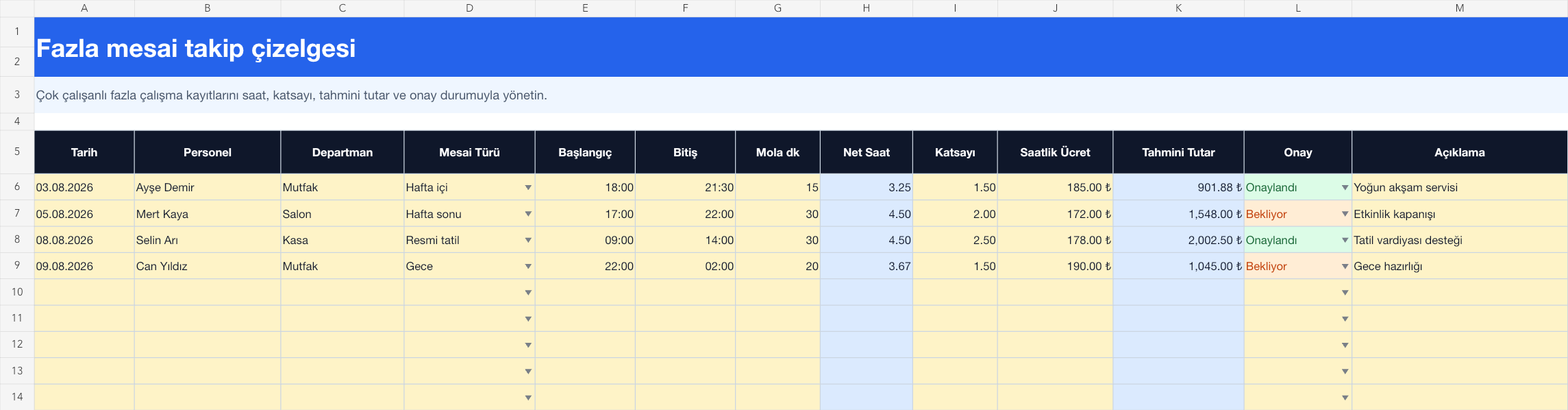
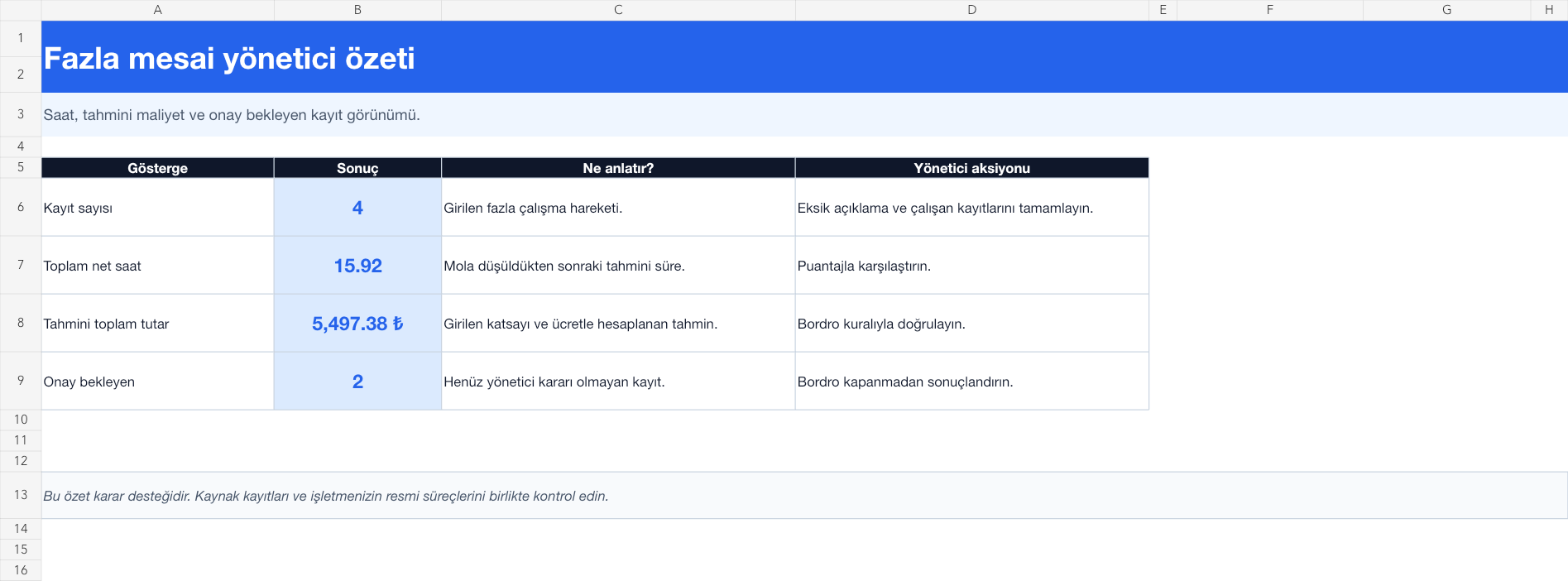
The images below are the actual data entry and executive summary pages of the workbook to be downloaded.
Step by step usage
Prepare the file according to your business
Record each overtime event on a separate line with date, employee, department, shift type, start, end, break, coefficient, hourly rate, confirmation and description. For registration beyond midnight, enter the actual start and end time; The formula calculates the time in a 24-hour cycle.
Run formulas and checks
Net time is calculated by deducting the break minute from the start-finish difference. The estimated amount is the product of net hours, the entered coefficient and the hourly wage. The summary shows total net hours, estimated amount, and records pending approval. Verify planned shift, actual timesheet and manager approval together before payment.
Turn results into action
Review the indicators on the summary page. Finalize the record pending approval before the payroll closes. Examine the time difference with the score. Find the cause of repetitive overwork shifts.
What does this Excel file solve?
Track multi-employee overtime records with net hours, coefficient, estimated amount, description and manager approval. Record each overtime event on a separate line with date, employee, department, shift type, start, end, break, coefficient, hourly rate, confirmation and description. For registration beyond midnight, enter the actual start and end time; The formula calculates the time in a 24-hour cycle.
What's inside the file?
Calculation of hours exceeding midnight, Break deduction, Estimated amount with coefficient, Summary of registration pending approval. The file contains sample rows, canned formulas, data validation fields, risk colorings, and executive summary.
Calculation and control logic
Net time is calculated by deducting the break minute from the start-finish difference. The estimated amount is the product of net hours, the entered coefficient and the hourly wage. The summary shows total net hours, estimated amount, and records pending approval. Verify planned shift, actual timesheet and manager approval together before payment.
Worked example: Approval of night closing shift
Start: 22:00. End: 02:00. Break: 20 minutes. Coefficient: 1.5. Result: Net time is calculated as 3.67 hours and the estimated amount appears. As long as the record remains in pending approval status, it will be included in the executive summary; The exact payroll amount is verified by the authorized rule.
Decisions that can be taken as a result of this
Finalize the record pending approval before the payroll closes. Examine the time difference with the score. Find the cause of repetitive overwork shifts
Common usage mistakes
Mistaking a shift past midnight as negative time. Dropping the break twice in both the shift register and the formula. Using the estimated amount as a final payroll receivable
Limits and proper use
The template provides operational record, forecast and confirmation view. The definition of overtime, coefficient, working time and wage application may vary depending on the contract and legislation; Final calculation requires expert control.
Compatibility and quality control
All 67 workbooks underwent formula error scanning, recalculation checking, and page-by-page visual inspection. Standard .xlsx file; Does not contain macros or external links. Formulas and data validation fields run inside the file. It is recommended that you keep the original file and work on a separate copy for your business.
Transitioning from Excel to automation
Use the file to quickly solve shift and workforce planning needs. When registration and approval traffic grows, move the same process to the Shiftmate workspace.
Relevant official and technical resources
Frequently asked questions
How is it different from the existing overtime calculation template?
The calculation template quickly measures a single scenario. This spreadsheet is designed to manage multi-employee, multi-date records with description and approval status throughout the period.
How to calculate registration past midnight?
When the start is entered as 22:00 and the end is entered as 02:00, the formula takes into account the 24-hour cycle; Still verify the date and timesheet record.
Where should I get the coefficient?
The value in the file is an example. Use the coefficient verified by the employee contract, applicable legislation and your payroll specialist.