Shiftmate
Absence and tardiness tracking Excel dashboard
Record absenteeism, tardiness, early departure and lost hours on an employee basis and see monthly risks.
Prepared by:Shiftmate Product and Operations Team · Son kontrol:
Actual file previews
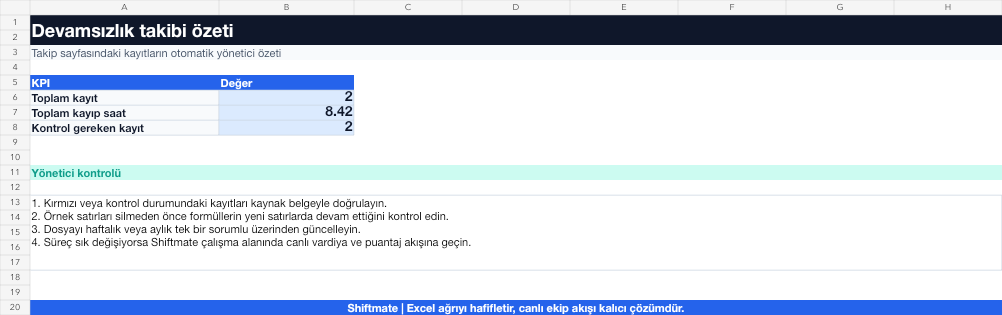
The images below are the actual data entry and executive summary pages of the workbook to be downloaded.

Step by step usage
Prepare the file according to your business
Enter the incident date, employee, incident type, scheduled and actual time, lost minutes, and description on a separate line for each incident.
Run formulas and checks
Lost minutes are collected by employee and incident type. Examining the number of recurring events together with the total duration separates one major event from frequently occurring small delays.
Turn results into action
Review the indicators on the summary page. Review recurring events on an employee basis. Verify excuse and document status. Record the action and closing date.
What does this Excel file solve?
Record absenteeism, tardiness, early departure and lost hours on an employee basis and see monthly risks. Enter the incident date, employee, incident type, scheduled and actual time, lost minutes, and description on a separate line for each incident.
What's inside the file?
Incident type record, Lost minutes calculation, Employee total, Action status. The file contains sample rows, canned formulas, data validation fields, risk colorings, and executive summary.
Calculation and control logic
Lost minutes are collected by employee and incident type. Examining the number of recurring events together with the total duration separates one major event from frequently occurring small delays.
Worked example: Monthly continuity view
12 employees. 8 tardiness records. A total of 214 lost minutes. Result: 146 minutes of lost time is concentrated in the same two employees, and a targeted meeting is planned instead of a general team announcement.
Decisions that can be taken as a result of this
Review recurring events on an employee basis. Verify excuse and document status. Record the action and closing date
Common usage mistakes
Confusing absence and leave registration. Estimate the lost minutes. Unnecessarily sharing employee health or excuse details
Limits and proper use
This recording does not produce a disciplinary decision. Share personal data only with necessary persons and follow company procedure and legal opinion.
Compatibility and quality control
All 67 workbooks underwent formula error scanning, recalculation checking, and page-by-page visual inspection. Standard .xlsx file; Does not contain macros or external links. Formulas and data validation fields run inside the file. It is recommended that you keep the original file and work on a separate copy for your business.
Transitioning from Excel to automation
Use the file to quickly solve shift and workforce planning needs. When registration and approval traffic grows, move the same process to the Shiftmate workspace.
Relevant official and technical resources
Frequently asked questions
Is the day off recorded as absence?
Approved leave is a separate status. Keep only attendance events defined by your business in this template.
Should lateness be evaluated by the number of events or minutes?
Use both together; frequency indicates the behavior pattern and minutes indicates the operation loss.